
312erik123
-
Posts
52 -
Joined
-
Last visited
-
Days Won
2
Content Type
Profiles
Forums
Gallery
Downloads
Articles
Store
Blogs
Everything posted by 312erik123
-
Hello, Problem solved, or kind of solved... The overrides from ImageMagic remained eventhough i had disabled the module. With them removed I now get webp-images, most of them are quite a bit bigger than the jpgs...maybe a quality setting... And for anyone else looking to trouble shoot php code using Logger::addlog(""); works well!
-
No modules don’t do that, thats what’s what I’ve been trying to do with the home slider module. @datakick & @the.rampage.rado do you know how to debug ImageManager.php or similar classes? Been trying “echo” and “echo <script> console.log…” but I get nothing…
-
Hey! Thanks for you quick responses. @the.rampage.rado I'm not using ImageMagic. @datakick Tried to update to latest bleeding edge, same issue. When i generate thumbnails, they are generated as both jpg and webp, where the webp is significantly smaller. However when i try to do the same thing for the homeslider, the images are the exact same size. This is how I call ImageManager:Resize method ImageManager::resize($sourceFile, $filepathWebp, null, null, 'webp') - where the sourceFile is a jpg file, the filepath is specified with a wepb extension...any ideas?
-
Hello, Trying to reduce the footprint of some parts of my website by using webp images. So I've been trying ImageManager:resize to convert to webp, however, the size of the image is always exactly the same as the input jpg-file. Anyone know why that is the case? How can I use ImageManger to convert wepb and reduce the size of my images? Thanks Erik
-

"Image Position" in Combination CSV import not working
312erik123 replied to 312erik123's question in Technical help
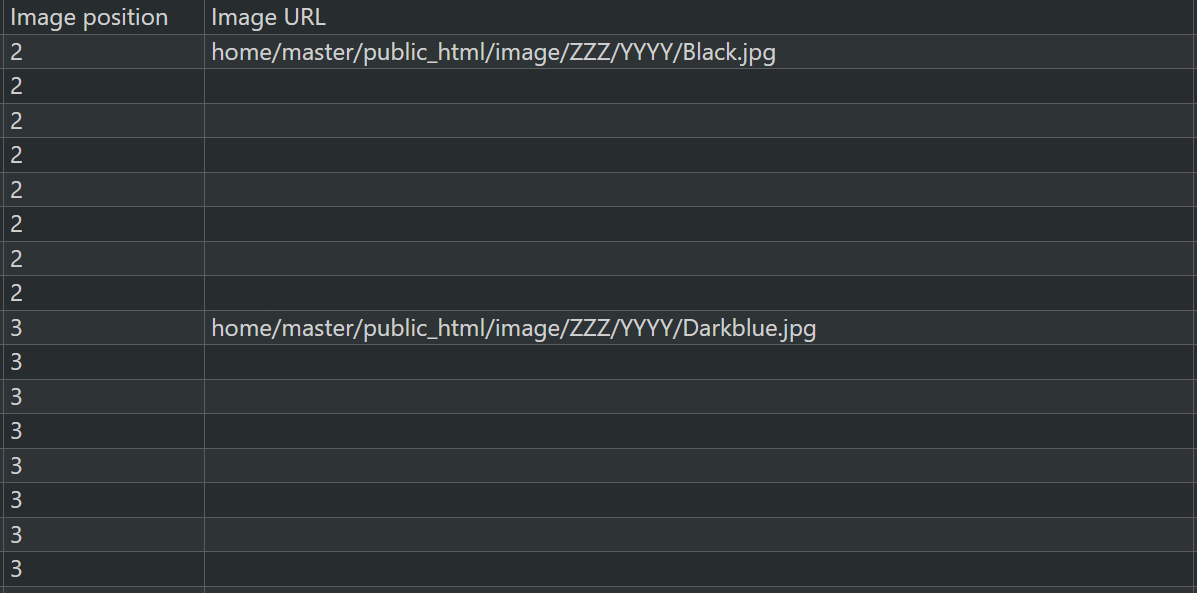
@datakick Hi, thanks for answering. In prestashop 1.6 i could use this structure: The first combination would get an image assigned to position 2 from the url - and all following combinations with position 2 and no url would get the same image. As thirty bees works today - how do I know which position is assigned to each image so that I can refer to that image? And where do I specify the image url? Thanks Erik
-
"Image Position" in Combination CSV import not working
312erik123 posted a question in Technical help
Hello, Think I found a bug in the CSV-import of Combinations. If an image in a combination is assigned an "Image Position", thirty bees seems to ignore it... a consequence of this is that if you have a combination that you want to have the same image as a combination that already has an image, it is not found. Anyone with the same problem? -
CSV import with Scandinavian letters broken since TB1.4
312erik123 replied to 312erik123's question in Technical help
Seems as it was the UTF-8 enconding - thanks for pointing me in the right direction! -
CSV import with Scandinavian letters broken since TB1.4
312erik123 replied to 312erik123's question in Technical help
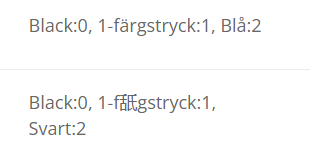
The strange this is that it only changes some of the characters: Checked it on a prestashop site where the import works without any problems...
-
CSV import with Scandinavian letters broken since TB1.4
312erik123 replied to 312erik123's question in Technical help
Hello, This issue has kind of re-appeared, now most of, not all, scandinavian letters are changed to chinese(?) characters... On bleeding edge...Anyone else? @the.rampage.rado Do you know anything? Br. Erik -
Feature suggestion: "Suggested database fixes"
312erik123 replied to 312erik123's question in Updating thirty bees
Ah, but maybe then the ability to select several or select all - like in the product listings in BO? -
Feature suggestion: "Suggested database fixes"
312erik123 replied to 312erik123's question in Updating thirty bees
I use the original default-bootstrap from prestashop, I've modified it so much so can't really change. But don't have the CLS problems on prestashop... -
Feature suggestion: "Suggested database fixes"
312erik123 replied to 312erik123's question in Updating thirty bees
So far just a testing environment - all in all very good. Experiencing some CLS (Cumulative Layout Shift) issues that I didn't get with prestashop so trying to understand why. Went straight to bleeding edge! -
Hey, Just migrated a store from prestashop to TB. After the migration TB recommended hundreds of database fixes - took like 45 min to apply them all. Would be great with a "Apply all" - button. More nice to have than need to have, but still 😀 Br Erik
-
Thanks! Works!
-
Have the same issue - did you manage to solve it?
-
Works! Perfect, many thanks! checked my backup site, it also hade 7.4 in the platform_check file before any changes/updates. So I guess settings.conf.php wasnt being updated, but the rest of the system was
-
Done. But can I verify that I now have the 7.4 version? "Advanced Parameters>Configuration Information" reads from settings.conf.php as I understand it?
-
Changing the permission did make the updater change a lot of files, but settings.conf.php still says that tb is built for 7.2…anyway to check if the upgrade is made besides this file?
-
Yes, as I wrote I tried that to - but no effect…a bug maybe?
-
Sure but still - backoffice says to use core updater to upgrade to version made for different php-version but does not work…
-
I’m on a shared hosting so I am forced to choose one version…
-
Afraid I can’t, running an older application on the same server so 7.4 is the highest I can go… Do I have to do a complete new install?
-
Hello, I get this message in "Advanced Parameters>Configuration Information": "Your server is running on PHP version 7.4.33. You should use core updater and fix your installation". My TB is built for 7.2. I've tried to upgrade to bleeding edge - still the same message. Tried to set the option "Target PHP version" to 7.4 and update but still the same... Am I missing something? Thanks in advance!
-
CSV import with Scandinavian letters broken since TB1.4
312erik123 replied to 312erik123's question in Technical help
We'll kind of figured that it was safer to stay on a stable release for a production environment...but maybe I'll set up a test environment and do the upgrade. Do you have good experience with the 1.5 alpha/beta? -
CSV import with Scandinavian letters broken since TB1.4
312erik123 replied to 312erik123's question in Technical help
Great, many thanks! I just replaced the two files from the commit and works as expected!