papagino
-
Posts
188 -
Joined
-
Last visited
-
Days Won
5
Content Type
Profiles
Forums
Gallery
Downloads
Articles
Store
Blogs
Everything posted by papagino
-
When looking at the Log files for today, I see this one: *ERROR* 2023/04/20 - 13:17:12: Fatal Error: require_once(): Failed opening required '.../modules/coreupdater/classes/Settings.php' If I open the folder under /modules/coreupdater/classes/, there is no Settings.php file, only these 2 folders. Why is this?

-
Hello people. After doing an "Update all modules" in my backoffice, it shows "500 server Error" when trying to access the Modules and Services, Preferences/Core Updater, Advanced Parameters/Performance and Administration/Permissions menus. I'm on Thirty Bees 1.4.0 running under PHP 7.4. I changed "define('_PS_MODE_DEV_', true);" in defines.inc.php, but no errors are showing when I get the "500 server Error" page. My site is now in Maintenance mode. Any ideas on how to fix this? Thanks Dan
-
Hello people, I am currently setting a new shop to replace my existing Prestashop 1.6.24 store and would like to know if anyone here has tried the Paypal module "PayPal Payments Pro Module by Adddons4Presta" to confirm if it is working with Thirtybees 1.4. I'm in Canada, I've contacted the developer of the module (Adddons4Presta), they believe their module is compatible with PHP8.1 but haven't tested with thirtybees as this is a Prestashop module and cannot guarantee it will work. Is there anyone here that use this "PayPal Payments Pro" by Adddons4Presta module and can confirm if this module is working with Thirtybees 1.4 under PHP8.1? Cheers, Dan
-
So easy when you know what you are doing... Thank you very much, that worked wonderfully... Cheers Dan
-
Not sure if this will help... Here is the exception file I've downloaded with the error... exception_20221117113718.txt
-
Yea, that's the thing, not sure what file to edit for the error... Some of the Prestashop modules that I can confirmed are not compatible with PHP8.1 are: - Creative Slider v6.6.9 - by WebshopWorks - Canada Post Shipping - by Presto-Changeo - Fedex Shipping - by Presto-Changeo I probably have more PS modules that aren't compatible with PHP8.1 but since those were the more important, I want to go back to PHP7.4, but not sure how to do it... Any advise on how to go back to PHP7.4 would be appreciated. Cheers
-
Hello people I am working on a test site and updated my Thirtybees version 1.3 to 1.4. Did the core updater also for database and applied all the fixes and all good. I wanted to check older Prestashop modules compatibility under PHP8.1 from PHP7.4 to see if they would also be compatible, the core updater said that I needed to updated the Thirtybees so I did. Some of my older modules are not PHP8.1 compatible, so now, if I go back to my host and set my site back to PHP7.4, I get this error message when accessing my backoffice: "Composer detected issues in your platform: Your Composer dependencies require a PHP version ">= 8.1.0". " So now the only way to have access to my backoffice is to set my shop to be on version PHP8.1, no way to go back to PHP7.4, this basically broke my shop that was working fine under PHP7.4 with Thirtybees 1.4. Any advise to solve this problem would be appreciated. Thanks Dan
-
Hello people, I am currently working on my ThirtyBees shop that will be replacing my current Prestashop 1.6.1.24 store. Regarding ThirtyBees 1.4... any estimate on when it will become available? Will it be PHP8 supported? Cheers Dan
-
Hello people, I am currently working on a new website to replace my current Prestashop 1.6 shop. When trying to unable "Enable Website Payments Plus" inside the PayPal v5.4.5 - by thirty bees, I can see Forbidden Triangle on the Payment page of my store. Do you know if Paypal Payment Plus is supported for Paypal Canada? Enable Website Payments Standard seems to work ok. Cheers Dan
-
Did you ever find a solution to this?
-
Order Status showing "Awaiting cheque payment " after PayPal payment.
papagino replied to papagino's question in Technical help
Cool, I will try it.... Cheers Dan -
Order Status showing "Awaiting cheque payment " after PayPal payment.
papagino replied to papagino's question in Technical help
One last question, when I change the values for the correct ones in the database, will this also change all previous orders statuses currently on my shop, or this will only change the statuses of new orders being placed? Cheers and thanks for your help. Dan -
Order Status showing "Awaiting cheque payment " after PayPal payment.
papagino replied to papagino's question in Technical help
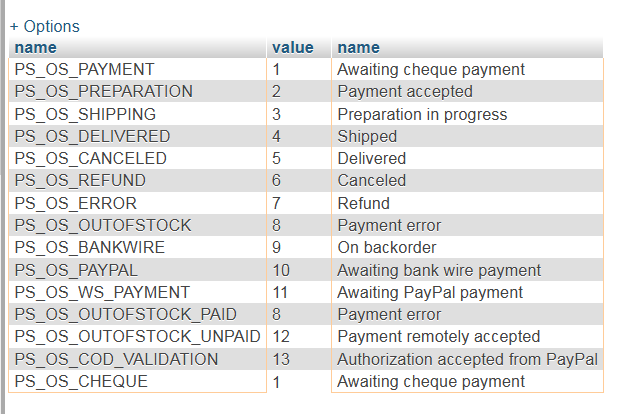
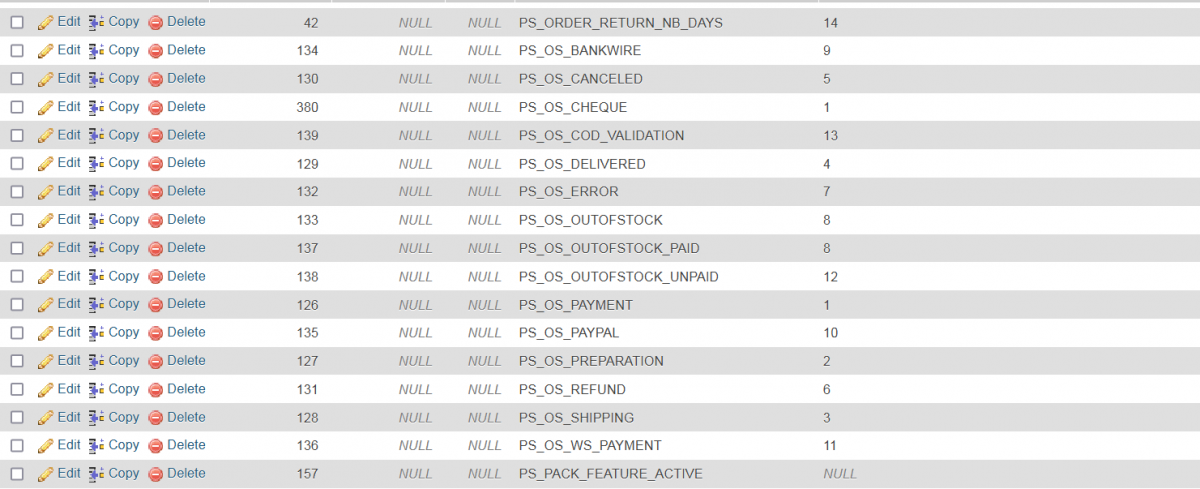
Ok, I've look at the tb_configuration table and I can see that the value for "PS_OS_CHEQUE" and "PS_OS_PAYMENT" both have "1" as their values and that "PS_OS_OUTOFSTOCK" and " PS_OS_OUTOFSTOCK_PAID" both have "8" as their values. When I run the SQL query you mentioned, I get this: and when looking at the tb_configuration table I see this: How do I fix this? Do I swap the values or the Description? Thanks for your help...
-
Order Status showing "Awaiting cheque payment " after PayPal payment.
papagino posted a question in Technical help
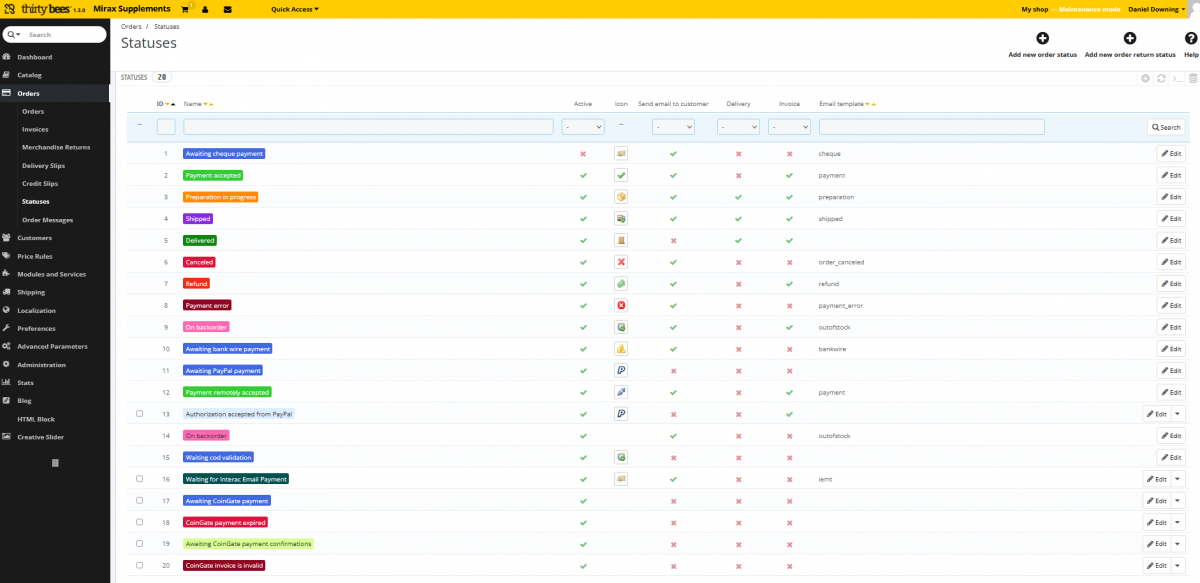
Hi guys, I have a little big problem, I installed a new Thirtybees 1.3 on my host in order to replace my current Prestashop 1.6.1.24 shop and imported most of the data from the Prestashop database to the Thirtybees database to get all my customers, inventories, sales... as the migration tools did not work in my case. (Drop, import and renamed tables with tbfz_...) Then I did a Database schema fix under the Core Updater tab in the backoffice to fix discrepancies. The Thirtybees shop (not live yet and under maintenance) seems to be working fine, except when I tried to make a test sale and paid with the PayPal v5.4.5 - by thirty bees module, the order "Status" is showing "Awaiting cheque payment" instead of "Payment accepted" like it should. This is telling me that the "tbfz_order_state" and "tbfz_order_state_lang" tables in the database are probably different from the one in Prestashop database. In order to keep all my previous Prestashop transactions intact in Thirtybees, is there a way to modify the Paypal module so it change to the correct Order Status after receiving a payment? (It is showing Status ID 1 instead of Status ID 2 after a payment is received) I have attached a screenshot of the Statuses windows in the Thirtybees Backoffice so someone can compare to see what is different. Any help would be appreciated. Cheers Dan
-
Thank you so much, this did the trick. Also, I didn't know about the tool in Core Updater to fix problems with database schema... Cheers Dan
-
Hey guys, I currently have a Prestashop 1.6.1.24 on one Hosting company and have created a new Thirtybees shop on another Hosting Company where I want to move my shop. I tried the Thirtybees migration tools but this didn't work and crashed my shop, so I had to restore Prestashop from a backup and this shop is still live as I am working on the new Thirtybees shop where I am using phpMyAdmin tool to move some of the database from Prestashop to Thirtybees. My current Prestashop store is with .com and the Thirtybees is a .ca URL. I have used phpMyAdmin from my Prestashop Hosting company to export some of the tables needed and then did a import via phpMyAdmin from the Thirtybees hosting company for those tables (Drop tables/import/rename tables from ps_... to tbfz_.... The problem I have now is the customers passwords no longer work, even if I go and change the passwords manually in the Thirtybees backoffice (in Maintenance Mode). I also tried creating a new customer with email and password from the Thirtybees shop, and I cannot logging using the password from the account I just created. Password reset also won't work. I'm guessing that this has something to do with the Password encoding/encryption that is not working from maybe a table I have imported from Prestashop to Thirtybees or maybe an encryption key in settings.inc.php file or something... Everything else is working so far for the tables I have imported from Prestshop (Sales, Inventory, Customers Data...) Any ideas what could cause this problem. Thanks Dan
-
Blockmyaccount always shows user links and logout button
papagino replied to Wartin's question in Theme help
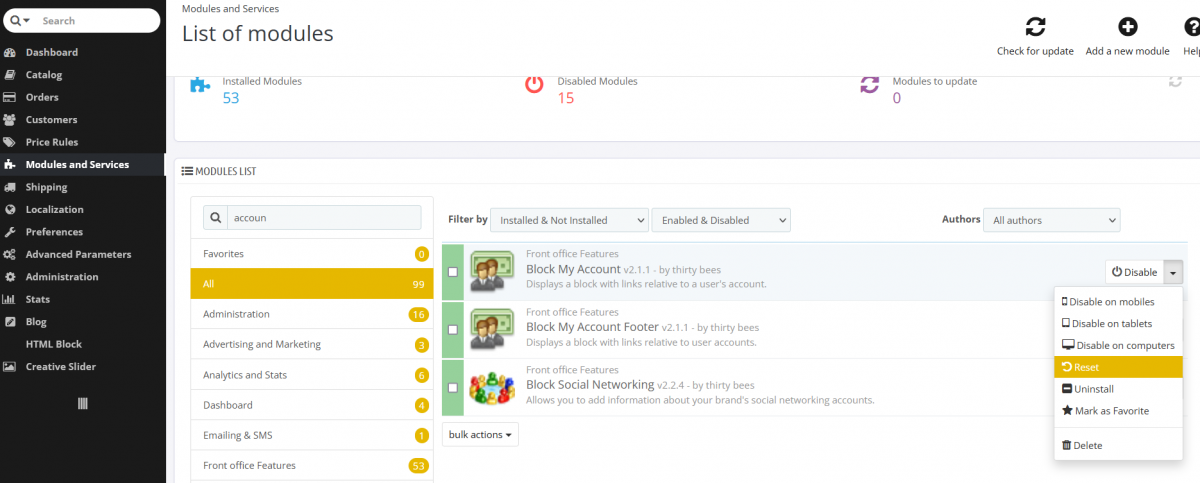
I was having the same problem with "My account" block always showing up, even when not logged in... I simply did a Reset in the Backoffice under the "Modules and Services" tab for the "Block My Account" and "Block My Account Footer" modules. (Click Reset in the drop down list next to those modules under "Modules and Services" tab). That fixed it with no code modifications. Cheers Dan Edit, Naaaaaa!, the reset only moved the My Account block on the left side...Bummer!!! I think this should be considered as a bug, this behavior is not seen on Prestashop 1.6
-
Hey guys, I am setting a new ThirtyBees shop and found this bug with the Bees Blog. My shop is available in French and English, if I create a Blog Post in only one language ex: English and I upload an image for the Post, then Post will show up on the French site showing only the image. It seems that it is impossible to write a post in one language only so it only show up in this language, even if you tick only one language beside "Available for these languages". I also noticed that the field "Link Rewrite" will auto generate in the other language after saving the post and returning to edit the post, also both language will be selected beside "Available for these languages" when going back to edit the post, even though it was saved with only one language previously. I think this is a bug, you should be able to post a different image for different languages when making a Post available in different languages as the images may have text inside of it. Anyone else seeing this behavior? Any way to fix this problem? Cheers Dan
-
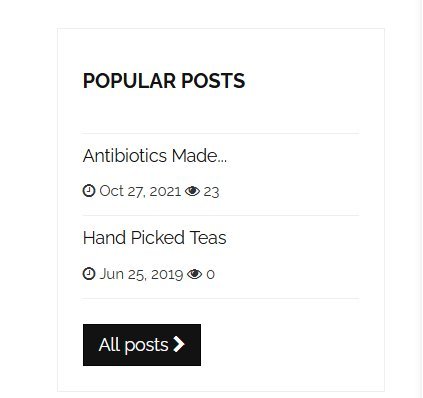
Hey guys, I am currently setting up a new ThirtyBees website and I am trying to find out how to remove the "..." in the articles titles under "POPULAR POSTS". I changed the truncate value from 20 to 30 in the "column.tpl" under modules/beesblogpopularposts/views/templates/hooks/column.tpl but it is not doing anything. Do you know how to fix this? See attached image Cheers
-
Thanks for your inputs, at this point, I don't really care about the prestashop site, as it has been to much worked on and modified. I want to start fresh with TB as the migration did not work for me, even if it showed successful, the backoffice site crashed immediately after I refresh the Backoffice page. I have a question for you, is it possible to have 2 sites sharing the same database with one in maintenance mode? Thanks for all your help.
-
My current website is in Catalog mode now (No shopping options) since September 22nd, because of the bug with my payments modules caused by my host changing to PHP 7.3. So this is why I have to move it to the new Host that support older PHP versions so to have my shop running again... Right now, I can take orders via email from my existing customers who are contacting me to place orders and I create PayPal invoice that I send to their emails. But the site won't work for new customers... Also, I use a separate invoicing system for all orders, online is just a way to accept orders and I supply receipts to customers via my offline invoicing system. Cheers
-
I agree, but what is better, having a shop open for business with and EOL PHP version, or a shop that is currently not operational and loosing thousand $$$ per week? As I said, this will give me time to setup a brand new ThirtyBees shop with new refresh theme and modules while still being able to operate my shop...
-
I think for now, I will have my site moved to the new host where PHP 7.2 is supported. This way, I will be back online to take orders. I will deal with the other stuff later... Cheers
-
I am using a Paid Canada Post and a Paid FedEx modules for my shipping, I think from Prestochangeo...
-
Ok, but do you know if I can use copy_shopdata from a Prestashop 1.6.1.24 to a thirtybees directly if they are on the same Host?