papagino
-
Posts
188 -
Joined
-
Last visited
-
Days Won
5
Content Type
Profiles
Forums
Gallery
Downloads
Articles
Store
Blogs
Everything posted by papagino
-
Yes, I don't recall installing this module, I just installed the Thirtybees version and now the Traffic sources is accurate, however, I still get the blank square for the "Year" period as mentioned above...
-
Hum! interesting it is Dashboard Activity v6.0.2 - by SLiCK-303. I will investigate... Cheers
-
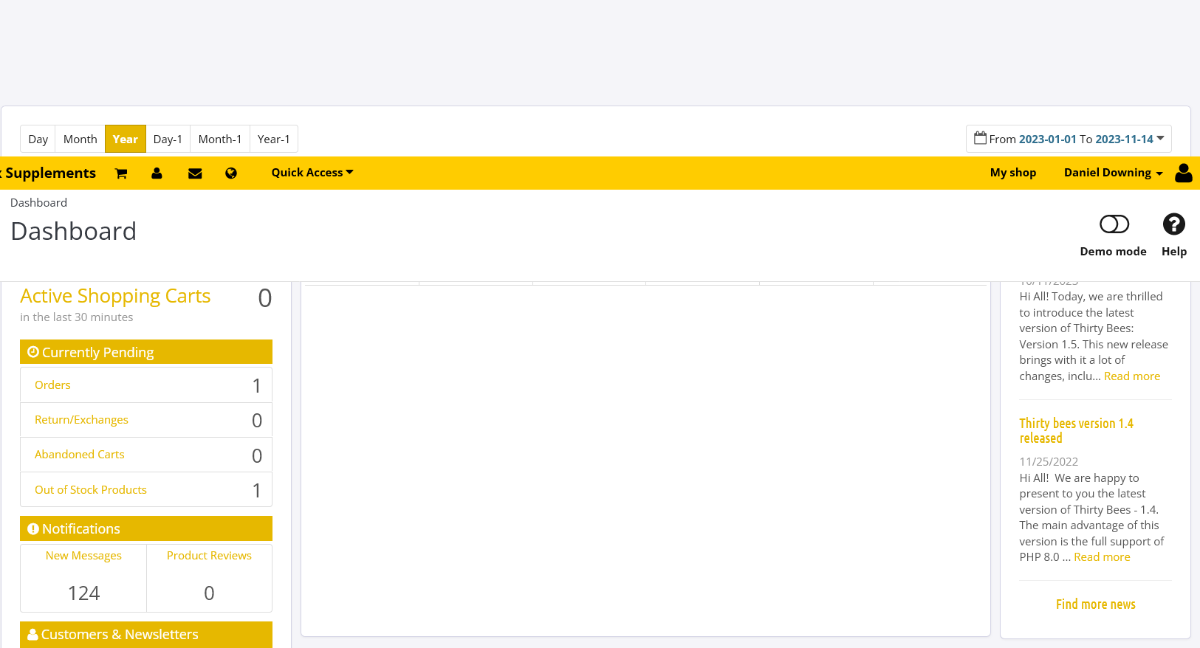
Yes, my Thirtybees 1.5 shop is always to date. The Dashboard Activity module is v6.0.2. I suspect this is caused with something in the database, maybe a table not configured correctly. My Thirtybees shop was a new install, not from a migration from Prestashop, however, I imported some tables from my previous Prestashop database (for customers/sales/inventory...) and renamed the tables for thirtybees and used the Database schema repair from the Core Updater tool. On my Backoffice Dashboard page, the traffic source shown is always showing maximum of 3 visits. However, the Stats shown under "Visitors origin" and "Visits and Visitors" from the Backoffice Stats page are recording visits properly for all periods. I also noticed that on the Backoffice Dashboard page, there is nothing showing when I click on Year, just a white square like below. Day, Month, Day-1, Month-1 and Year-1 are working like it should.

-
*** UPDATE*** When looking in my Error Logs, I can see these two warnings: Attempt to read property "value" on null modules/dashactivity/views/templates/hook/dashboard_zone_one.tpl Undefined array key modules/dashactivity/views/templates/hook/dashboard_zone_one.tpl Could this be related to the problems with visits not being reported? Any help would be appreciated... Cheers
-
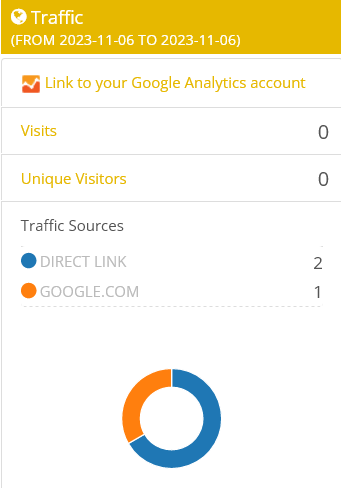
I've noticed for a long time, that on my Backoffice Dashboard page, the traffic source shown is always showing 3 visits, even if the stats for "Visitors origin" and "Visits and Visitors" is showing a lot more visitors. Visits and Unique Visitors are at zero, different of what it is on the Stats page. My Thirtybees shop is not linked to a Google Analytics account. I am on Thirtybees 1.5.0 latest as of today. Any ideas for why this is happening? Cheers,
-
I think my site is being attacked by bad bots also, I have the "Blackhole for Bad Bots" module installed and just last night, it kicked out 6 IPs. Some of the IPs are Brute force attacks according to abuseipdb.com so not sure what's up with that! When checking my Host Resource Usage, the "Input/Output Usage" reached 3MB/s witting a minutes or so and that wasn't me using Matomo. There is basically no traffics on my new site from legitimate customers and I have very little sales, most sales are from existing customers and not from new visitors. (I think Big Pharma do not like the products I sell and want to kill my business...) Not sure what to do! Cheers
-
I do have Matomo installed on Thirtybees, the problem is if I leave Matomo open to monitor live visits to my site, it create lot of request on my host and exceed what is allow for my shared hosting plan... So I only use it when needed.
-
I am on a shared server.. Don't want the extra cost for a different hosting plan just for Matomo...
-
Hello people, I was monitoring the traffics on my website using Matomo Analytics module, but I quickly learnt that leaving the Matomo module or website open take up lots of resources such that I got several warnings from my hosting company to fix the problem or account could be at risk of being suspended. I was leaving the Matomo page opened to monitor when visitors would come to my site, I now limit access to Matomo to fix the problem with high resource usage on my hosting account... Anyone else having this problem and is there any way around this? Cheers
-
Anyone else can replicate this problem???
-
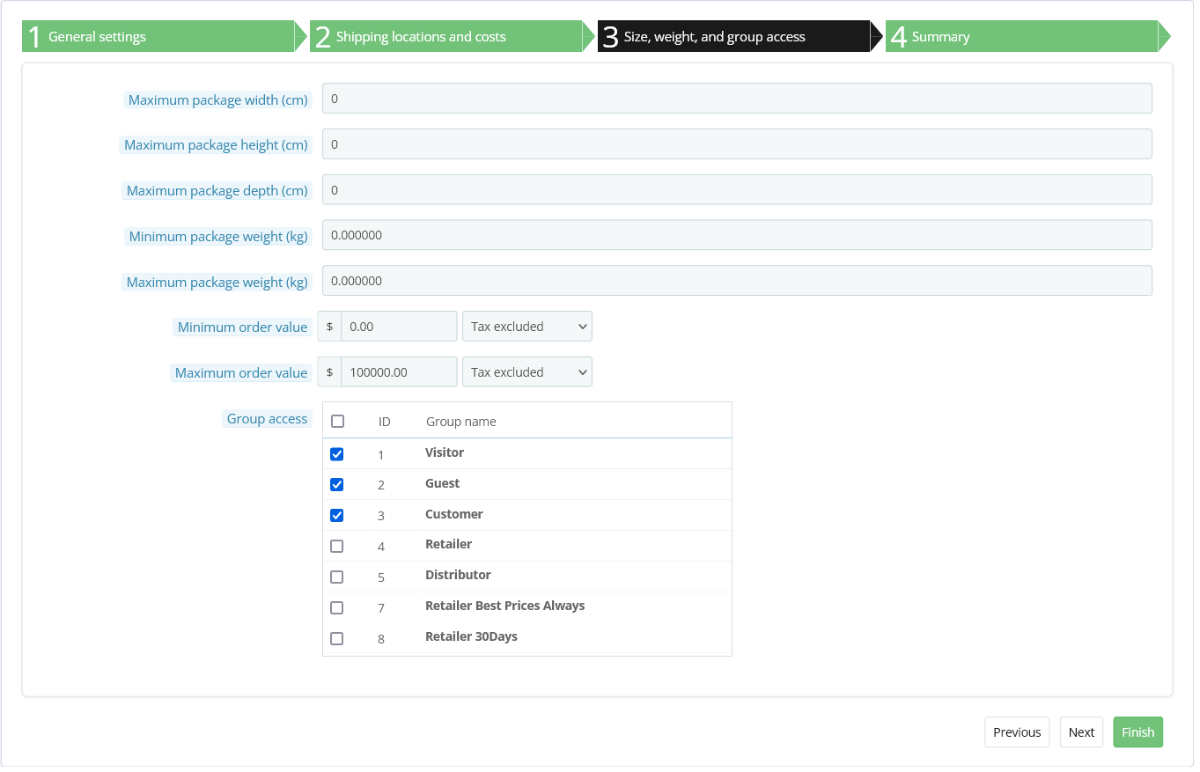
***SOLVED*** Yeaaaaaa! I found the problem... Un-ticked "Visitor" for Group access inside the "Canada Post Expedited (Free shipping on order over $150)" configurations did the trick, no more errors. 😀😁😆 Wait a second, does adding my IP in the"Maintenance mode "Maintenance IP" field automatically set me as whatever I have set myself inside the customer configuration window in Backoffice? I was set to Customer for the "Group access" and "Default customer group". If I set myself to Visitor instead of Customer, error may go go away even if I tick Visitor as mentioned above for the carrier!!! Will try again tomorrow to confirm this... Seems the site detected that I was a Customer and not a visitor from my IP even if I wasn't logged in!!! Oh well, maybe there wasn't any problems at all if this is the case...??? Will try again tomorrow to confirm this...
-
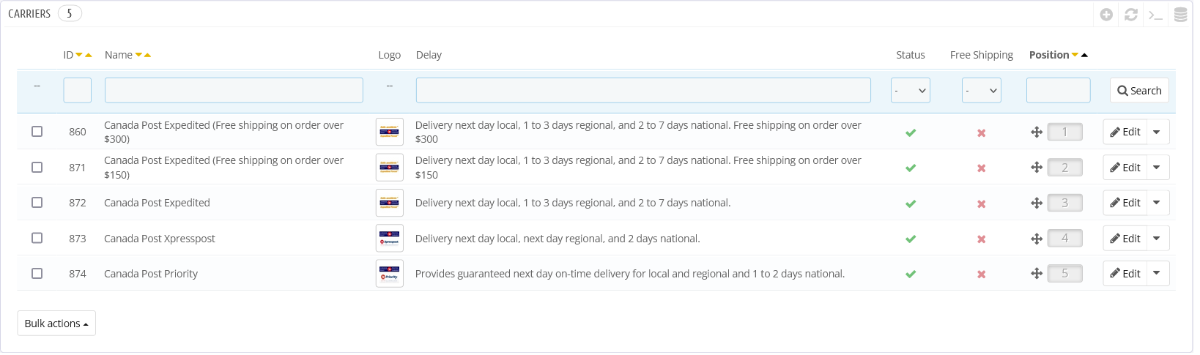
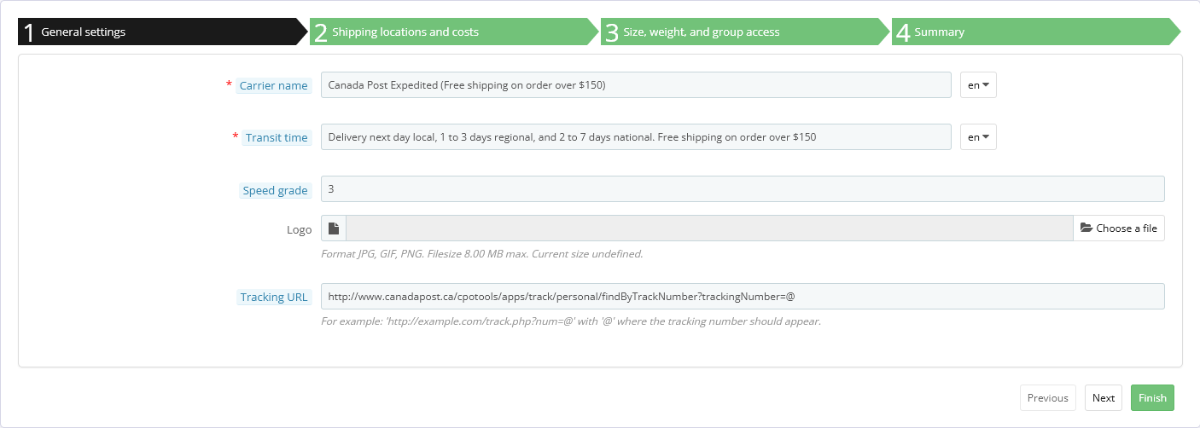
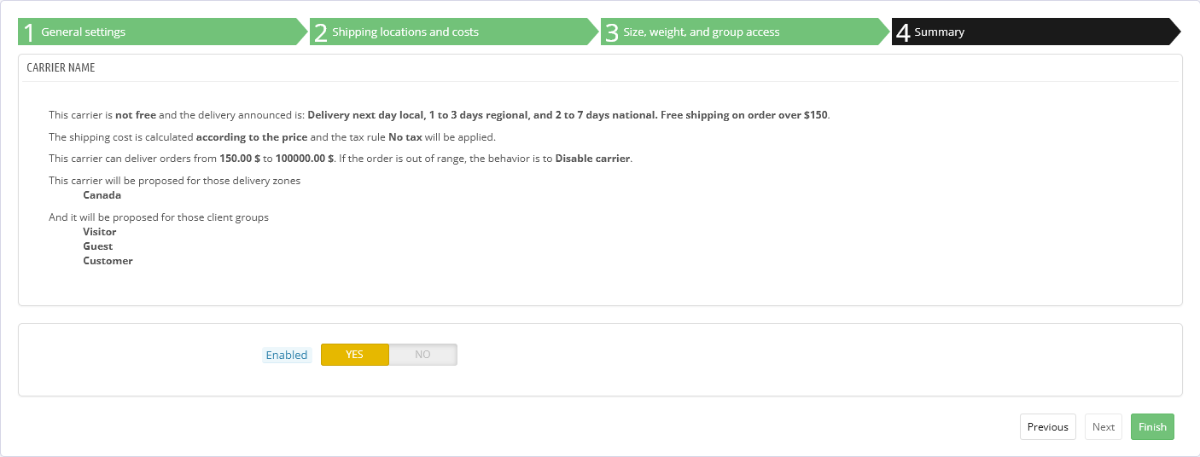
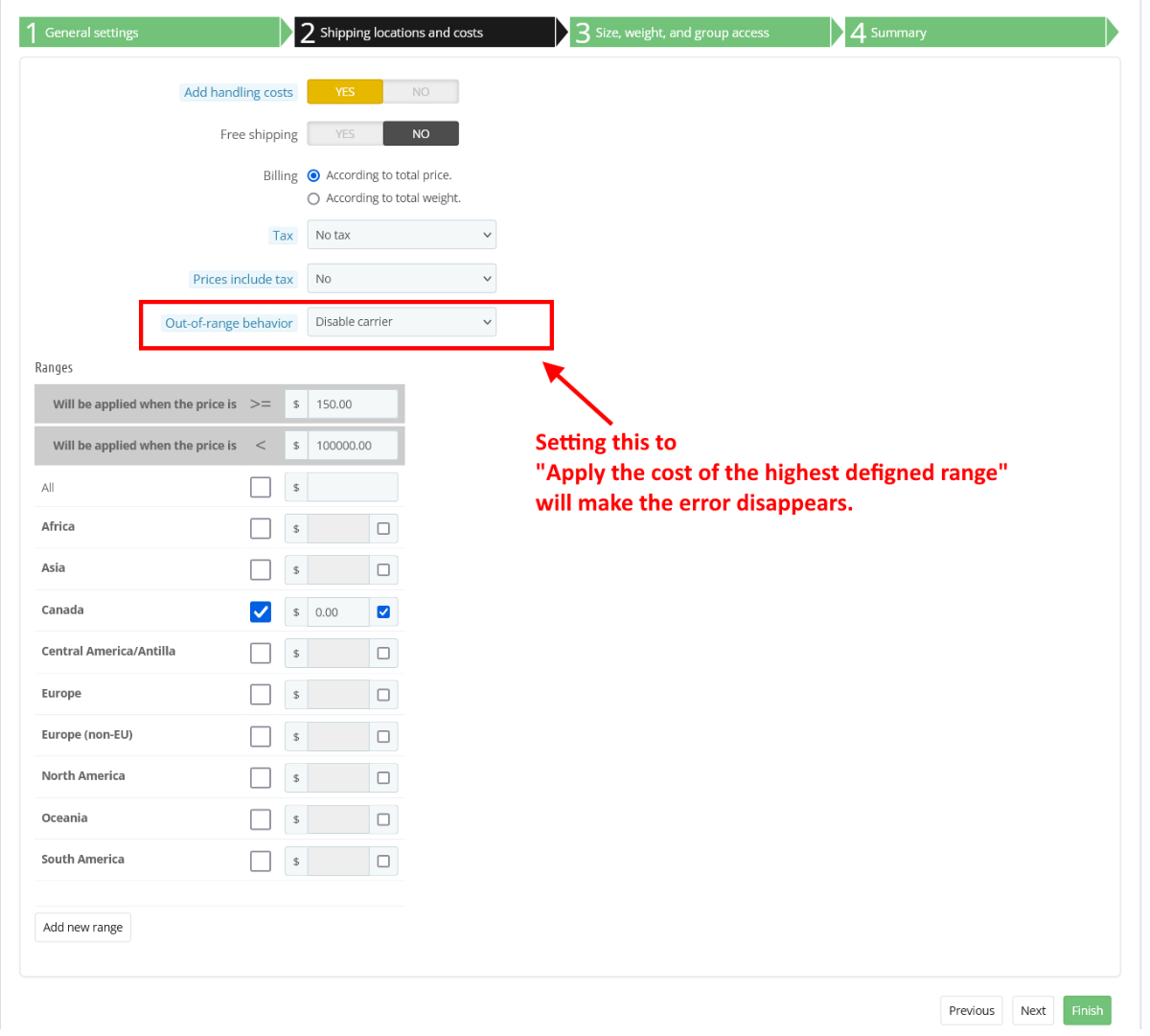
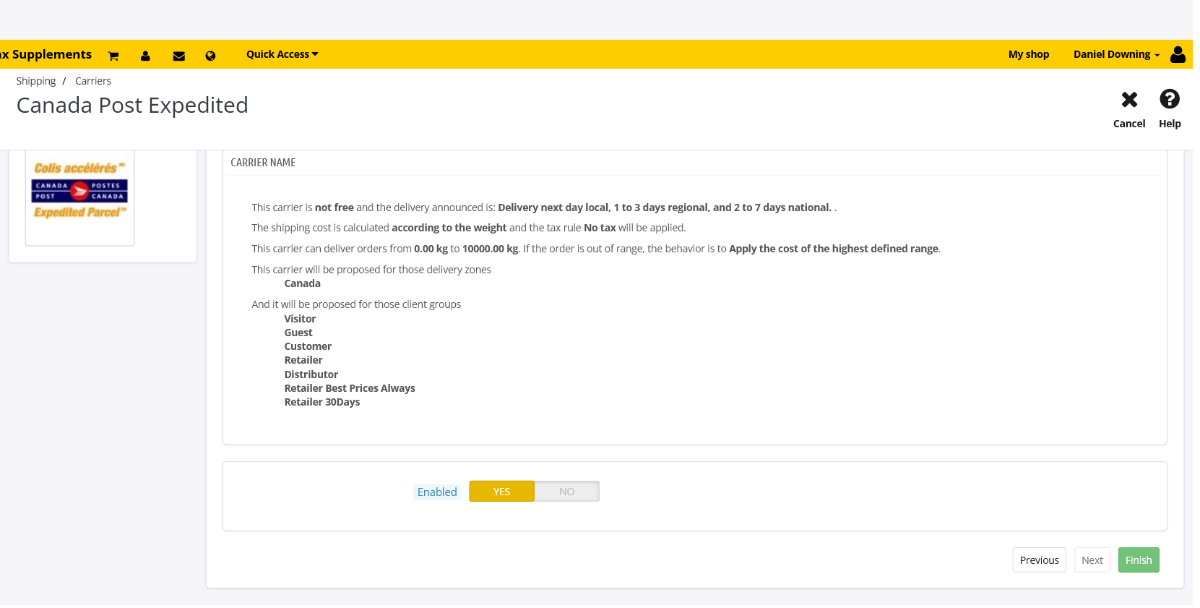
Thanks for your input datakick, Here is what I have found, my shop is setup to offer free shipping on orders over $150 for regular customers and free shipping for orders over $300 for my resellers. I have created 2 carriers for those groups for the free shipping. When a visitor add items in the cart that exceed $150, then a new "Canada Post Expedited (Free shipping on order over $150)" appears in the shipping options. When a reseller login and add items in the cart that exceed $300, then a new "Canada Post Expedited (Free shipping on order over $300)" appears in the shipping options. - If I disable the carrier for "Canada Post Expedited (Free shipping on order over $150)", the error disappears. - If I add items in the cart for over $150, the error disappears. - if I set the "Out-of-range behavior" for this carrier to "Apply the cost of the highest defined range" instead of "Disable carrier", then the error will also disappears. So, it seems that the NEW problem is when you have the "Out-of-range behavior" set to "Disable carrier" that is causing the problem. See my settings below: Now here is how the Canada Post Expedited (Free shipping on order over $150) is configured: Something must have changed in the recent Thirtybees 1.5 Bleeding edge updates to cause this new problem as it was not there about a week ago. You can probably replicate this by creating a new carrier with the settings I've illustrated above... Any inputs to resolve this would be very much appreciated. Cheers Dan
-
I did change the message in translation to "Ignore this message and proceed to checkout..." but this error was not showing up before, I think the shipping was left blank in the cart, then it was displaying the different carriers option once the visitor had created a profile. I will do some more digging this week to see what up with that... Cheers
-
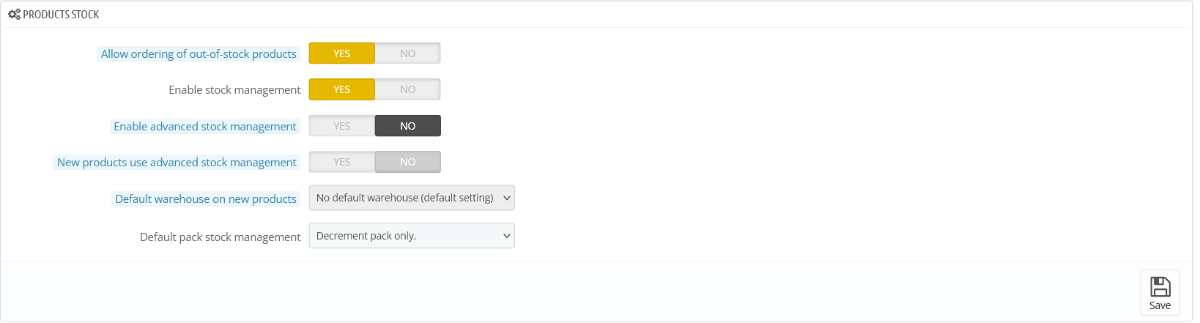
Thanks for your help... I am pretty sure it is because visitors that are not log in (with a shipping address) is being interpreted as being from another zone than Canada, so no shipping option is available in the cart until a Canadian shipping address is added ... If I log in with a test customer with a Canadian address, then all is good. I think maybe something have changed in Thirtybees 1.5 core so that the cart is now looking for a shipping option prior to a shipping address to be set for a guess visitor or before a customer is logged in. If I remember correctly, before, the cart would show the shipping to be either Free or $0.00 until a shipping address was made available for the cart. Not sure what changed... Advanced stock management is disable on my shop, see my setting here:
-
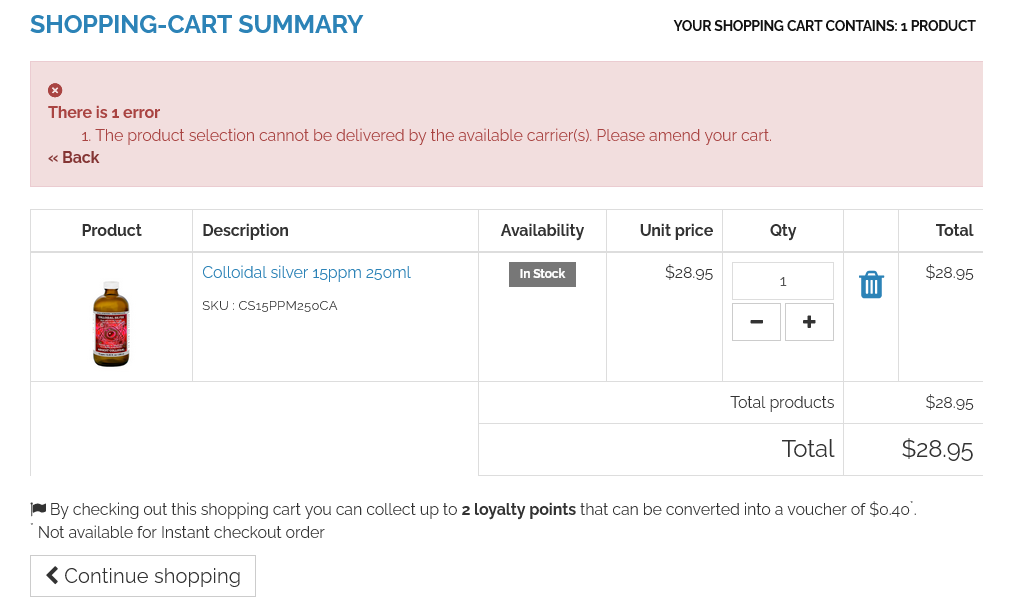
Hello people, I noticed a new problem on my shop since I did a core update about a week ago on my Thirtybees 1.5 Bleeding Edge installation. If you are a new visitor and add an item to the cart then click on the "Proceed to checkout" button, on the following page "SHOPPING-CART SUMMARY", this error will show up "The product selection cannot be delivered by the available carrier(s). Please amend your cart." This only happens if you add items to the cart prior to log in to the site first or if you are a new visitor and have not yet setup a Guest or customer account with a shipping address. I only ship to Canada and all shipping options only have Canada set in the range section... So maybe this is why I am getting the error, because visitors that are not log in (with a shipping address) may be interpreted as being from another zone than Canada so no shipping option is available in the cart until a shipping address is added ... I wasn't getting this error before if I remember correctly, it only appeared about a week or so ago after I did a core update for Bleeding Edge 1.5. This is not good as visitors/customers will think something is wrong and will leave you with an abandoned cart. I am using a paid shipping module (Canada Post: Rates and Estimator v4.2.1 - by ZH Media) and this was working fine before. I know the error (The product selection cannot be delivered by the available carrier(s). Please amend your cart.) is triggered by Thirtybees and not the Shipping module because this error is listed inside the "Front Office Translation" and not under "Installed Modules Translations" in the Backoffice. I just performed another core update for Thirtybees Bleeding Edge 1.5 today, so it is the latest... Any ideas on how to fix this and anybody else seeing this error? Thanks Dan
-
Hello people, I found a bug with the Bees Blog v1.6.1 - by thirty bees under Thirtybees 1.5 Bleeding Edge (Latest). My website is in English and French and If I create a Blog Post in English only and select (tick) English for the selection for "Available for these languages", the Blog Title and Link Rewrite fields will automatically be created for the French language using the data that is used for the English Post. (English is the default language for my site) If I try to manually deleted the contents in those fields for the French language and click the Save or Save and Stay button, those fields will again be automatically filled with what is used for the English Post. This is bad, because the sitemap will generate links for those Blog posts that don't exist for the French language. Can anybody replicate this behavior and confirm that this is a bug for this module? Cheers, Dan
-
Ok I created keys for reCAPTCHA v2 and it is working now... Any possible updates for this module in the future to make it work with the latest version of reCAPTCHA (V3 & Enterprise) ?
-
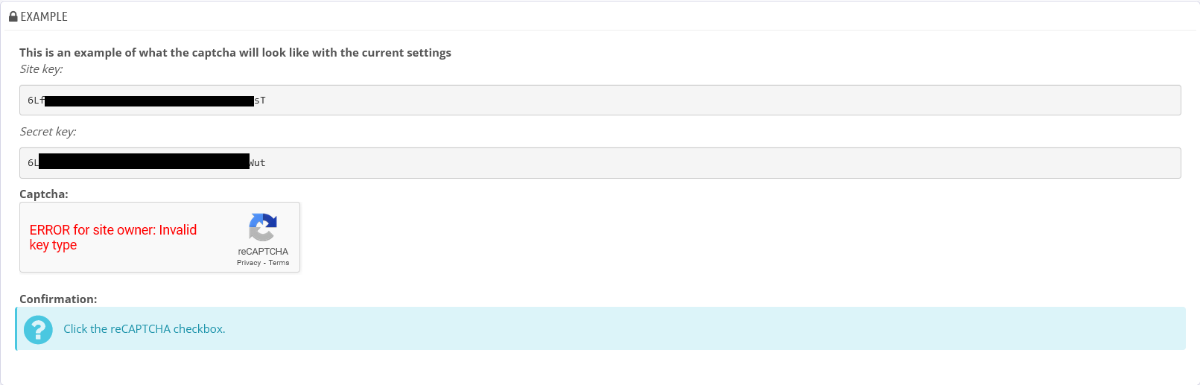
I created a reCAPTCHA site key and a reCAPTCHA secret key for my site using reCAPTCHA v3 but I get this error after I click on save in the module: ERROR for site owner: Invalid key type Do I have to recreate the keys for reCAPTCHA v2 to have the module work properly?
-
Hello people, I noticed that when I enable the Thirtybees "Block Featured Products" module and do a Rich Result Test on Google Rich Results, it will give you a "Invalid items are not eligible for Google Search's rich results." The invalid items detected if for this "Either "offers", "review", or "aggregateRating" should be specified". Is there any way around this? This may affect your page ranking as the snippets will not be showing or be valid in Google results. Any idea on how to resolve this and can anybody replicate this? Cheers, Dan
-
I tried to add html in the Theme configuraton for the Home hook and transplanted the module to the this hook, but the content doesn't appear on the homepage. This module seems to be only to add images...
-
Hello people, on my Prestashop site, the homepage content is done via the "Home text editor" module. The content created with this PS module will be shown as your homepage (your website URL). On my new Thirtybees site (not yet online and in maintenance mode for development), there is no module like the "Home text editor" utilized with Prestashop. My website uses the Niara Theme with 3 columns setup, I am on Thirtybees Bleeding Edge 1.5 under PHP 8.1. I created a page using the HTML Block module and set its Hook for "Homepage content," but when viewing the homepage with a smartphone, it doesn't look too good, the content is not centered (Top Image) and there is no padding at all on both sides. The text is almost going out of the screen in portrait or landscape mode. The page text alignment is set to "Justify." The page looks fine when viewed on a PC, however. When comparing the padding (both sides) for the CMS pages and the page created with the HTML Block, it is different on the HTML Block content where the Padding is less (or not at all). Still, all the pages done via the CMS module shows great and is responsive to whatever you use to display the content of the website. Is there a way to use CMS to create the homepage content? It seems impossible to set the Hook to Home, no way to transplant it either. I am missing something here, is there a particular module to create the homepage that I missed! Can anyone replicate the problem I see with the HTML Block content not showing correctly when viewed in Portrait (or in Landscape) mode on a smartphone? Does the HTML Block module need modification to add Padding on both sides? Any help on this problem would be greatly appreciated. Updates... I have done a workaround by adding my content inside a table with margin set to 15px like this: <table style="margin-left: 15px; margin-right: 15px;"> <tbody> <tr> <td> content in here... </td> </tr> </tbody> </table> But I still think that this should be done automatically via the module or a CSS for this module when the HTML Block module is used in the Homepage content hook. Cheers, Dan
-
Some text on the contact form is not translate to French, how to fix this?
papagino replied to papagino's question in Technical help
Niara, but I am using a clone of it as I am modifying some of the CSS for look... -
Some text on the contact form is not translate to French, how to fix this?
papagino replied to papagino's question in Technical help
That make sense... Cheers -
Some text on the contact form is not translate to French, how to fix this?
papagino replied to papagino's question in Technical help
Hi, thanks for the reply, I did look inside Localizations->Translations->Front Office and the messages above were not in there. (I clicked on "Expand all fieldsets" then used "Ctrl F" to search for the messages to be translated, but they were not there.) This is on Thirtybees Bleeding Edge 1.5, anyone with this version should be able to confirm the problem with unable to translate those messages. Cheers -
Some text on the contact form is not translate to French, how to fix this?
papagino replied to papagino's question in Technical help
On the Create an account page, if you leave the email field blank and click on "Create an account" button, a "Please fill out this field." error appears and if you enter a non-valid email address, the error, "Please enter an email address." appear. How do I translate "Please fill out this field." and "Please enter an email address." errors? Also, when guess checkout is enabled, and don't select anything in the drop-down menu for the Province/State and click on the "Proceed to checkout" button, you get the error "Please select an item in the list.", how do I translate this error in French? Could not find these in the "Error message translations" under Localization/Translations of the Backoffice. Any help would be appreciated. Cheers,