papagino
-
Posts
187 -
Joined
-
Last visited
-
Days Won
4
Content Type
Profiles
Forums
Gallery
Downloads
Articles
Store
Blogs
Everything posted by papagino
-
Revws module - possibly missing product structured data
papagino replied to 30knees's question in Module help
Hi datakick, I have your paid version of the Revws - Reviews v2.3.1 module. I have created a Product Category called "Featured Products" (Hidden) and associated products in this category that only have review ratings. I then setup the "Block Featured Products" module to use this product category from which to pick products to be displayed on the Homepage. Now, those products show up on the homepage under "Our featured products" block, however I still have the problem with aggregateRating (invalid items detected) even when the products displayed have rating. What am I missing??? Here is my website: https://www.miraxsupplements.ca -
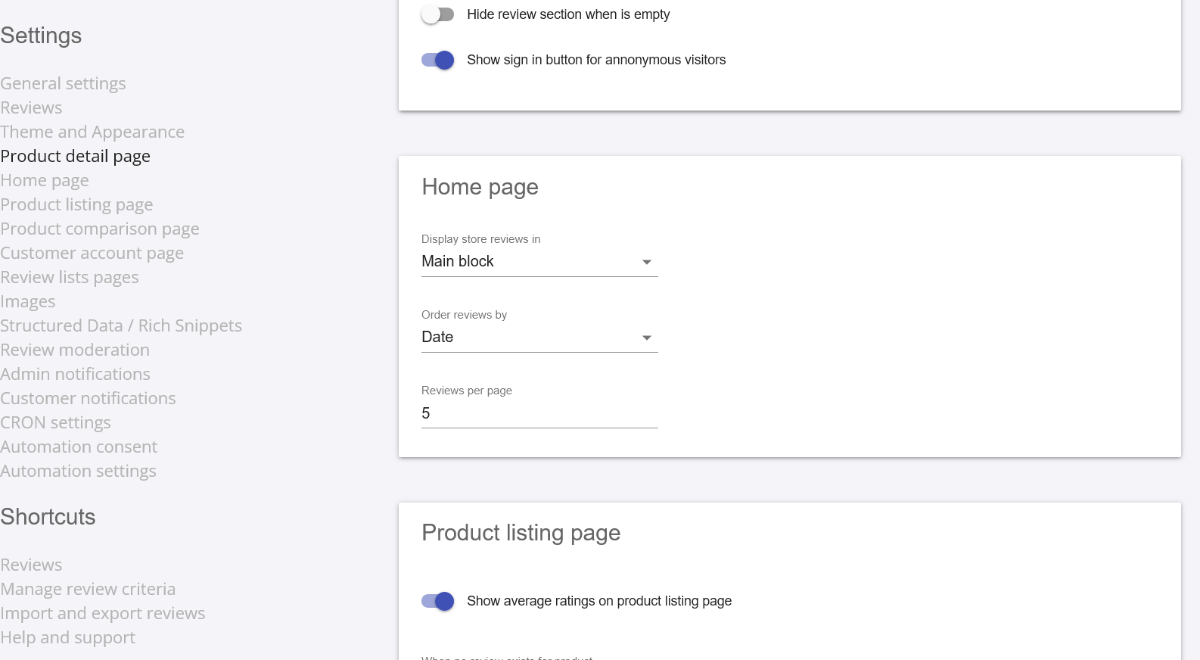
...If is set the Display store reviews in "Tab" then everything is working OK. I will set it like this and see if it work without other issues... Cheers
-
In this module settings, as soon as I set the "Display store reviews in" to "Main Block", I get the problem... I will contact @datakick on the subject...

-
OK I found that the review module "Revws - Reviews v2.3.1 - by DataKick" is the cause of the problem. If I disable the module, then the links for feature products works...
-
Also, would you recommend that I upgrade thirtybees to Bleeding Edge?
-
Ya, I think that's what it was, something to do with polyfil dependency... I also noticed that Matomo doesn't track all visits to my site, any idea what could cause it? I have Matomo Web Analytics v1.3.1 - by thirty bees.
-
OK I will try that. I noticed that my google ranking has dropped a lot recently, maybe the problem with my site has something to do with this...
-
Also, I had to modified these files for whatever reasons that I don't remember: Changed files themes/community-theme-default/header.tpl modified themes/niara/header.tpl modified Could this be a problem?
-
Ok, yes I get the same result... I tried disabling Matomo and same problem... Could it be caused by the Canada Post shipping module?
-
How to I set to view page in mobile view on Firefox?
-
https://www.miraxsupplements.ca/en/ Let me know if it work and on what type of phone you are using...
-
I tried on Firefox, Chrome and Samsung internet, same problem...
-
I am on Android 10, also tested on Android 5.1 and not working on there also... Maybe to old???
-
What thirtybees version are you using?
-
For me it not working on Android phone, but is working on tablets and PC... Not sure what's causing this.
-
I've just noticed that when I view my site on a mobile phone and scroll down to the "Our Featured Products" section, nothing happen if I click on a product image or its "Add to cart" button. Can anyone else able to replicate this? It is working fine on a regular computer, only seeing the problems on mobile devices... I tried to disable and uninstall the Block Featured Products module and this doesn't fix the problem. I am on Thirtybees 1.5.1 Please advise... Thanks
-
Thanks datakick for the updates, my site is bilingual, maybe the missing "*" in the robots.txt was the problem in my case... Will try the new version and investigate further... Cheers
-
Yes I did... and that was a very long time ago, a year maybe...
-
The file robots.txt on the server does have Disallow: /blackhole/ on the bottom...
-
I just find out that when I do a search for my business on bing and duckduckgo, the page https://www.mysite.com/blackhole/ come up in the search results. If a visitor click on this link, then he is granted with the blackhole page and block from my site. Google however doesn't crawl this page How can I fix this?
-
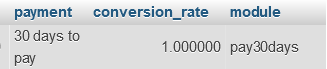
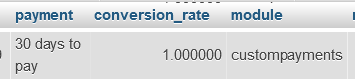
The Query did not find anything, however, when looking for sales data created under Prestashop with the "30 days to pay" payment option, the Module Names are different in the database, the name under Prestashop sales was "pay30days" and the new sales under Thirtybees, the name is "custompayments". See the screenshots below: Sales made under Prestashop... Sales made under Thirtybees... If I rename all the "pay30days" in the module column to "custompayments", will this fix the problem or this will cause more problems? Thanks for all your help...
-
Hi, thanks for your response, yes I did import customers and sales from my previous Prestashop store. If I remember correctly, I used the COD payment module from Prestashop and modified it to create the "30 Days to Pay" payment option as Prestashop did not have a Custom Payment Module to do it. Now, on Thirtybees, I created the 30 Days to Pay payment option with the native "Custom Payment Methods module". So, if I understand what you said above, it is possible that maybe the problem is because the module name I used when it was created on Prestashop may be different from the module name I have created with Thirtybees Custom Payment Module. I will check the orders table, column 'module' for orders that was done under Prestashop to see if this is the case. If this is the cause (module names are different) can I just rename the names in the "module" column for previous Prestashop orders data to the name I now have with Thirtybees for the "30 Days to Pay" payment option? Thanks for your help...
-
Hello people, I have a Thirtybees 1.5 shop. I have created 2 Custom Payment Methods using the Thirtybees native Custom Payment Methods module. When checking my Error logs in the Backoffice, I get the following Warning and Exception: Warning [CONF_PAY30DAYS _FIXED] is not a valid configuration key classes/Configuration.php:1111 and Exception ThirtyBeesException: [CONF_PAY30DAYS _FIXED] is not a valid configuration key classes/Configuration.php:1112 Any idea what is causing this and how to fix it? Cheers
-
... Must have, because it was the one I had... Cheers
-
Yes, I don't recall installing this module, I just installed the Thirtybees version and now the Traffic sources is accurate, however, I still get the blank square for the "Year" period as mentioned above...