netamismb
-
Posts
179 -
Joined
-
Last visited
-
Days Won
6
Content Type
Profiles
Forums
Gallery
Downloads
Articles
Store
Blogs
Everything posted by netamismb
-
In Google Console, Google is crawling a lot of pages (more than 1k pages) with index.php?controller=trigger&ts=1710225603 which is going to {"status":"failed","error":"Forbidden"}. Any idea how I can get rid of them?
-
I managed in the end to pay with PayPal. Thank you!
-
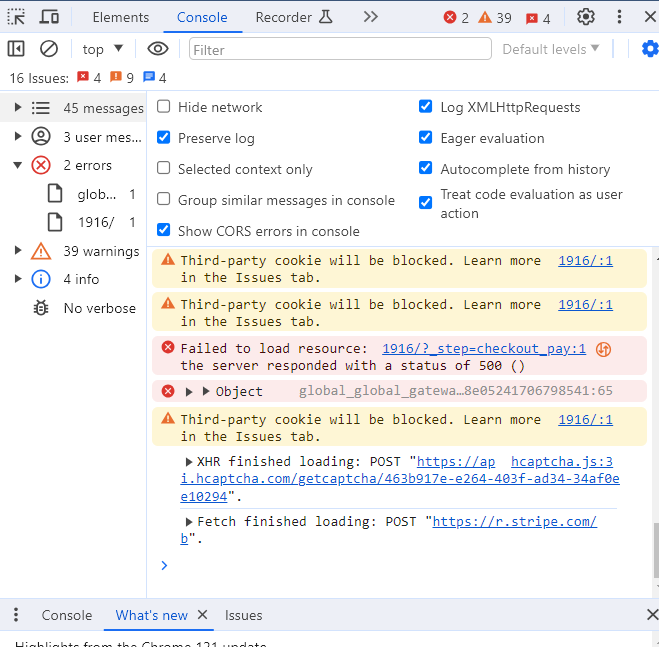
I still can't renew my subscription, this is what I get in console.

-
I used a Revolut card for Ivory member.
-
I also have an issue with my subscription, I just got the error: There was an error processing the payment. Please try a different payment method or contact us for assistance.
-
thanks a lot for this. The issue was with a postal code being wrong hence the module for dealing with the delivery threw an error. I wouldn't have managed to figure it out without Collect PHP Logs.
-
In BO, when I want to visualise an order, I get a 500 error. Is there a way to debug this? I have tried with the debug on, but it didn't show anything. It happens suddenly... In console I get 2 errors: Uncaught SyntaxError: Invalid or unexpected token index.php:117 Failed to load index.php:1 resource: the server responded with a status of 500 ()
-
ERROR AL TERMINAR DE HACER LA COMPRA (rder?step=1)
netamismb replied to Garcia's topic in Foro en Español - Discusión General
¿Intentaste con el modo depuración activado? No hay ningún error? -
in Search console I found: <img class="img-responsive center-block" itemprop="image" src="https://www.rock4u.eu/1134-Niara_large/camiseta-mujer-iron-maiden-logotipo.jpg" outside of search console <img class="img-responsive center-block" itemprop="image" src="data:image/png;base64,iVBORw0KGgoAAAANSUhEUgAAAAEAAAABCAQAAAC1HAwCAAAAC0lEQVR42mNkYAAAAAYAAjCB0C8AAAAASUVORK5CYII=" srcset="https://www.rock4u.eu/1134-Niara_large/camiseta-mujer-iron-maiden-logotipo.webp" title="Camiseta mujer IRON MAIDEN - Logotipo" alt="Camiseta mujer IRON MAIDEN - Logotipo" width="458" height="458"> But this page is indexed in search console.
-
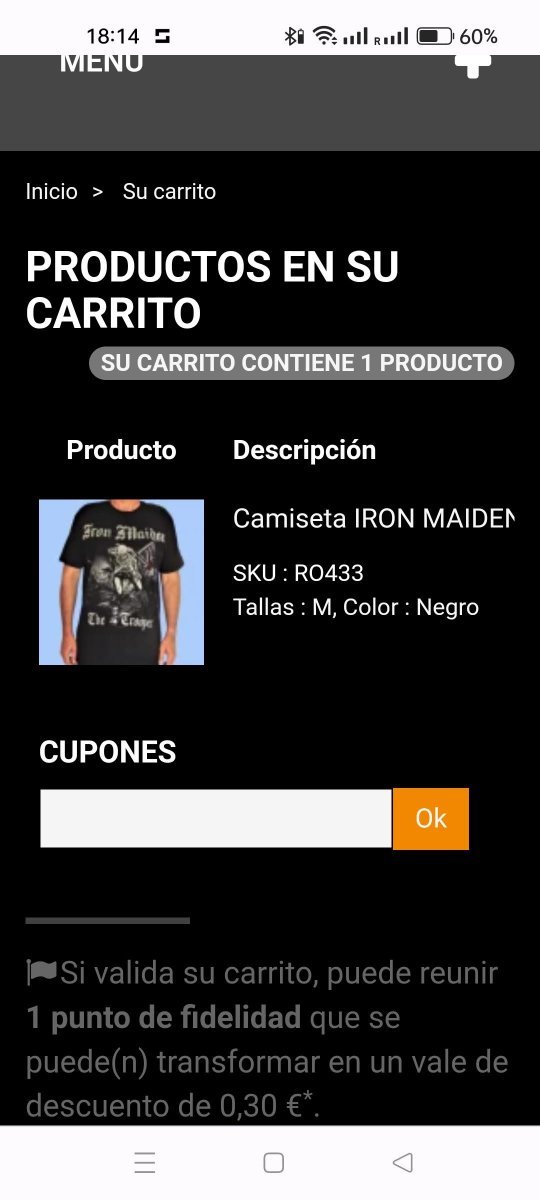
The link is ...., how to reproduce: - add a product to the cart, - go to checkout (ir a la caja) - the product and the description are visible, but one needs to scroll horizontally to see the price, quantity and total price
-
Is not related to TB version, I am using Niara v1.3 and Tb 1.3 in one site and in another TB 1.4. Might be the issue the cart module.
-
I have an issue with the cart - Niara theme, the product summary in the cart is not responsive Steps to reproduce: - Add a product to cart - Confirm - The product summary is not responsive - you need to scroll to the right to see the quantity and the price How can I make this responsive?
-
I have an issue with the cart - Niara theme, the product summary in cart is not responsive Steps to reproduce: - Add a product to cart - Confirm - The product summary is not responsive - you need to scroll to the right to see the quantity and the price I am missing something?
-
Thank you @datakick, I believe you are correct. I removed all rich snippets markup metadata from this file, including itemscope itemtype="https://schema.org/Product" from <div class="product-container" itemscope itemtype="https://schema.org/Product">. And now I don't have any critical issues when testing rich results.
-
In Niara theme, on product-list-item.tp I have: <span class="price product-price" itemprop="price" content="{if !$priceDisplay}{convertPrice price=$product.price}{else}{convertPrice price=$product.price_tax_exc}{/if}"><>{if !$priceDisplay}{convertPrice price=$product.price}{else}{convertPrice price=$product.price_tax_exc}{/if} <meta itemprop="priceCurrency" content="{$currency->iso_code}"> </span> But this line will show: <span class="price product-price" itemprop="price" content="12,90 €"> 12,90 € <meta itemprop="priceCurrency" content="EUR"></span> And correct will be (I believe): <span class="price product-price" itemprop="price" content="12.90"> 12,90 € <meta itemprop="priceCurrency" content="EUR"></span> Any idea how can I achieve this?
-
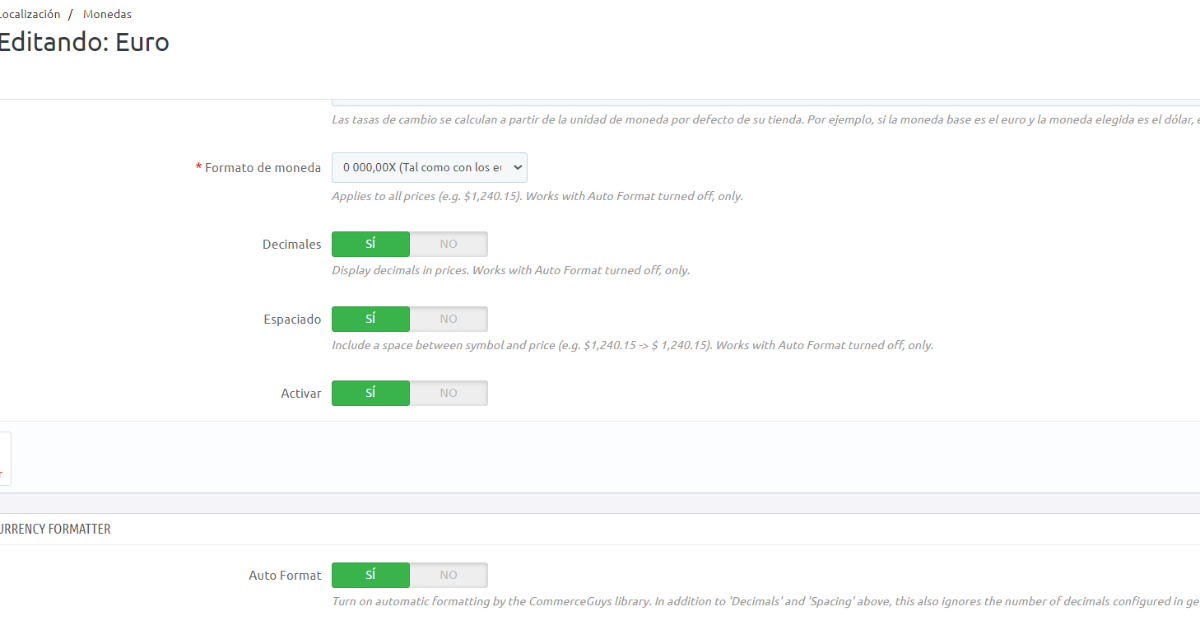
Here is my settings. I chose the comma as this is the preferred format in Spain, but as it is hurting the rich results I am fine changing it.
-
I am using Niara theme and I have an issue with how the price is displayed. On the home page and products in the same category, the price is displayed with a comma for example 12,9 Eur. On the product page, the price is displayed with a dot 12.9. Is it possible to have the price displayed everywhere with a dot? The issue with having the price displayed with a comma triggers an error for rich results: Invalid floating point number in property 'price'.
-
I am using now 1.4 .0
-
Just to update, I managed to migrate from Prestashop 1.6.23 to ThirtyBees 1.3 and I have been live with it since last week 👍. The next challenge, is to migrate from WooCommerce to ThirtyBees.
-
I manage to migrate to an actual copy of production. When doing the critical issue for the database, one change is tagged as critical and dangerous Column ps_store.hours has data type text instead of varchar(254) is it fine to not doing it?
-
I have some problems with migration from Prestashop to Thirtybees, on production, I get an out-of-memory issue (which is related to the hosting). I manage to have the migration done on my local with a new theme, but the copy of the database is one month old. Will be possible to use the database on production with the new files and deal with the database after? Or there are lots of writes in the database during the migration?
-
module homeslider - is not displaying the images on frontend
netamismb posted a question in Module help
I have updated the module homeslider to version v2.1.0 but now, when I upload an image I can see it in the back-end but not in the front-end. The images exists in the folder /img/homeslider. I am using Niara theme and is not up to date, do I need to change something in the theme to pick-up the images? -
I added the copyright in the module blockcmsinfo.
-
Yes, it is working on my local. But I cannot go live for now, as some of the TB modules don't show on frontend, so I am working now to change the theme. I will update when I manage to have it on production.