Yabber
-
Posts
159 -
Joined
-
Last visited
-
Days Won
26
Yabber's Achievements






-
The PHP team has only released patches for the currently supported versions of PHP. By contrast, the teams responsible for Linux and Unix distributions, such as FreeBSD, have released patches for all versions of PHP from 5.6 onwards. Yesterday, there was a PHP update in Debian; all versions of PHP were updated. In FreeBSD, too, all versions of PHP were updated.
-
I apologise for the incorrect information. My hosting provider, which runs servers on FreeBSD, somehow applied this PHP patch incorrectly yesterday, and as a result, data saving in Thirtybees within the back office wasn’t working across all PHP versions. They’ve now fixed the issue and everything is working fine today. 🙂
-
Installing the PHP patch causes very serious problems in Thirtybees. It is not possible to save ANY data in the back office. The problem occurs with both PHP 8.1 and PHP 8.3
-
Check your theme’s directory to see if there are any PDF templates there: /themes/your-theme/pdf/
-
Your code for this template is incorrect. https://github.com/thirtybees/thirtybees/blob/main/pdf/order-slip.product-tab.tpl#L100
-
My payment options is gone, and changed to one new (Hacked??)
Yabber replied to Alex Hansen's topic in English
A great many Prestashop modules have security vulnerabilities that allow the shop to be hacked. Check that you do not have any such modules installed: https://security.friendsofpresta.org/ -
Multiple tracking numbers for an order, needed or not?
Yabber replied to the.rampage.rado's topic in English
Fixing the Niara template: https://github.com/thirtybees/niara/pull/100
-
Multiple tracking numbers for an order, needed or not?
Yabber replied to the.rampage.rado's topic in English
@the.rampage.rado I never use Advanced Stock Management in the shop; I believe it’s a feature that causes nothing but problems and offers no benefits whatsoever. So I haven’t tested "split orders" with ASM. Yes, different carriers must be configured for the products for "split orders" to take place. Yes, with the module I’ve attached, you can change the carriers for individual sub-orders in "split orders" mode. And, as a point of interest, a Prestashop fork called PhenixSuite has fixed this.
-
Multiple tracking numbers for an order, needed or not?
Yabber replied to the.rampage.rado's topic in English
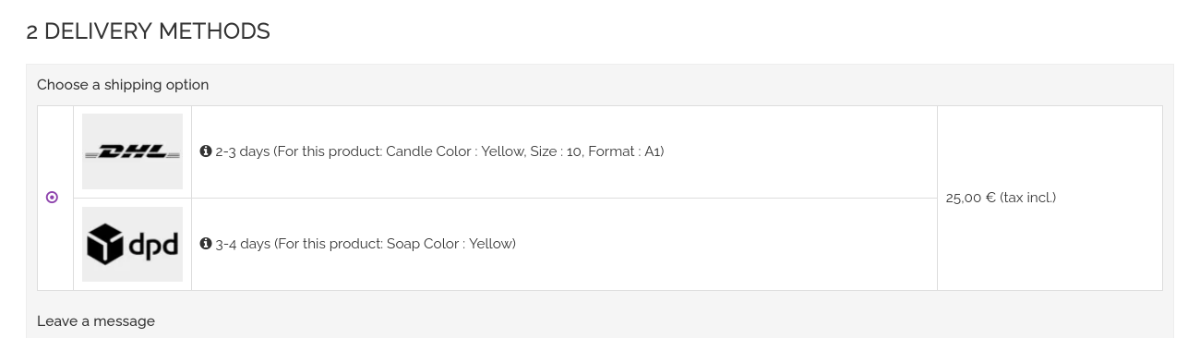
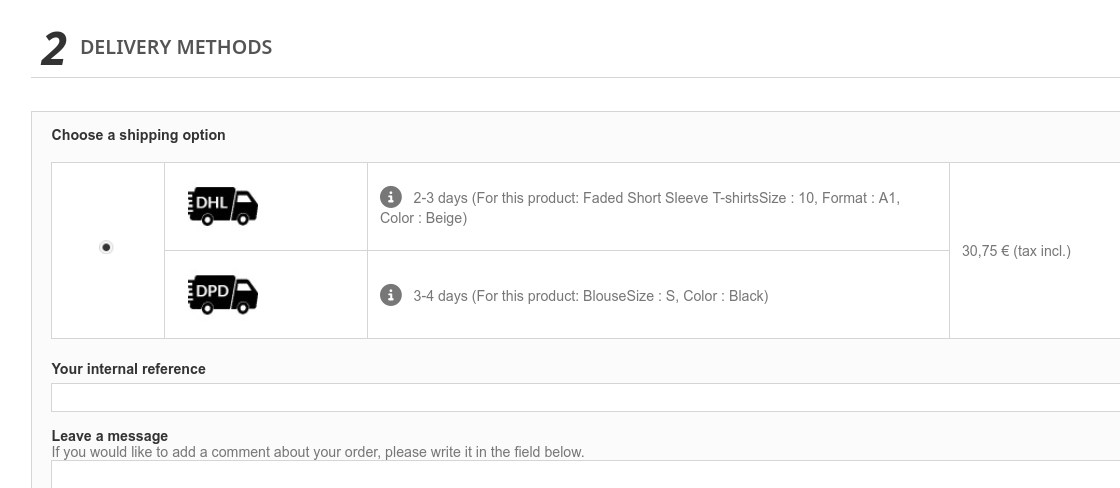
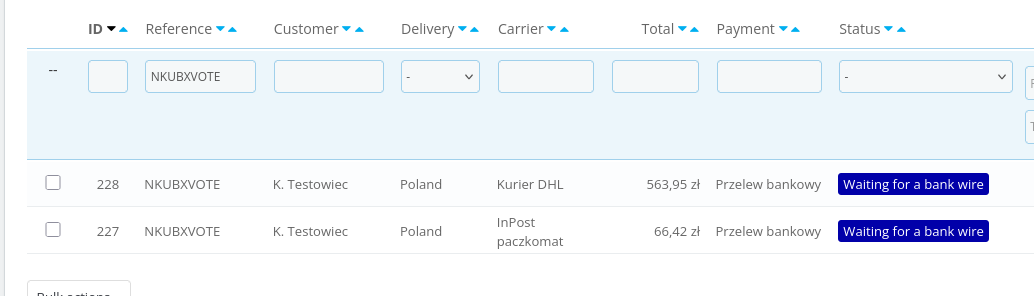
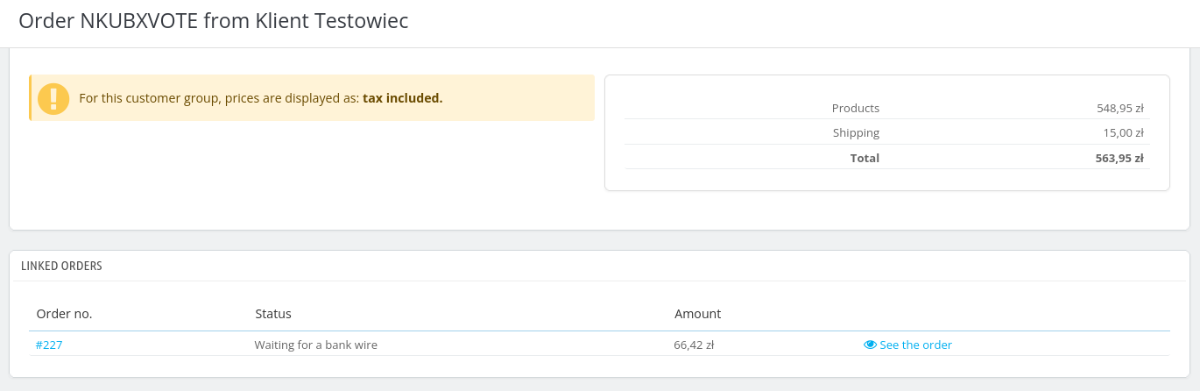
As far as "split orders" are concerned, functionally almost everything works correctly. In the back office, orders are created with different IDs but the same reference number. At the bottom of each such order, there is a note stating that it is a combined order. Each of these sub-orders can be handled by a different carrier module. However, on the front office, all templates for all versions of PrestaShop and ThirtyBees are broken, and nothing is displayed for carriers in "split-order" mode. The option is available to choose from, but the customer doesn’t know what they’re choosing. And once this option has been selected, a valid split order is created. The delivery cost, however, is correct; it is the sum of the costs for all carriers.
-
Multiple tracking numbers for an order, needed or not?
Yabber replied to the.rampage.rado's topic in English
@DRMasterChief So it’s actually about multi-shipping, rather than simply changing the carrier on an order. The solution you’ve described, using the module you’ve developed, has one major drawback – it won’t work properly with any carrier module or with any external integrations such as Base.com or eMagicOne. Install any DHL, DHL Pickup, DPD, FedEx or UPS module – none of them will work properly. That is why the standard solution available in thirtybees, known as "split-order", is a better option. If a single customer order involves several carriers, that order is split into several separate sub-orders, and in each of these sub-orders, all carrier modules and all shop integrations with external order-handling systems work correctly. -
Multiple tracking numbers for an order, needed or not?
Yabber replied to the.rampage.rado's topic in English
This action is lawful, as the amendment to the terms of the contract – the order – is made by mutual agreement between both parties to the contract. This email constitutes an addendum to that contract. -
Multiple tracking numbers for an order, needed or not?
Yabber replied to the.rampage.rado's topic in English
Multi-shipping and changing the carrier for an order are two different features. In many countries, changing the carrier for an order in this way is against the law. It constitutes an unauthorised alteration by the shop to the contract entered into with the customer. However, many shops do this, and the module for changing the carrier for an order is included in the attachment. tbchangecarrier.zip -
This Mollie module for PrestaShop is terribly put together; it contains 99% unnecessary code. It would be better to use Claude to adapt this module: https://github.com/mollie/thirtybees to the latest version of Thirtybees with PHP 8.3 and the latest version of the Mollie API.
-
In Claude, you enter the prompt: ‘Adapt the attached module for Thirtybees 1.7.0 and PHP 8.3’. You paste in the ZIP file containing the module, and within 5 minutes the module is fixed.
-
A perfectly crafted template is one that requires no configuration whatsoever, as the layout is controlled entirely by CSS. There are templates sold for PrestaShop that store millions of variables in the configuration. And then people complain that the shop’s pages take half an hour to load.