
x97wehner
-
Posts
521 -
Joined
-
Last visited
-
Days Won
30
Content Type
Profiles
Forums
Gallery
Downloads
Articles
Store
Blogs
Everything posted by x97wehner
-
Through some tinkering I figured out the issue here, sort of. My issue was a result of me wanting to insert the state iso code into the address in place of the name. The OOB code requires country name and state name on the forms. When I replaced the state name with state iso code, the forms didn't know where to place the state name field and shoved it below country, since both are required. That made my printed addresses the way I wanted, to NA standards, but put the form field order way out of whack. Replacing the iso code with name on the address makes the forms render correctly, but now the address spells out the state, which can work but is undesireable IMO. Since the state field is dynamic based on the country, what I'd love to know is how to put the country at the top of only the forms, so that the user can designate it and then have the correct prefiltered state list when they get to it further down the form. The current flow I have now is non-user friendly if my user is non-U.S. based. They have to skip the state field, populate the country, and then go back up and populate the revised state list.
-
That's what I thought it would be also, but it doesn't affect anything. Same format.
-
An even better solution!
-
Just a word to the wise on this module. If you are updating it to the latest version and have customized the emails at all, make sure you download a copy elsewhere as the update will overwrite them. Ran into this the other day and luckily had the emails stored elsewhere so I could just upload them back in. Also, this module works perfectly and I highly recommend.
-
I've done this, but it doesn't change the order of the fields on the input forms. It just modifies the address in display.
-
Bumping this again. Anyone with a quick answer to help?
-

PayPal issues + Remove address requirement to check out
x97wehner replied to bree1818's question in Module help
Not that it helps you much, but perhaps it will give piece of mind. I setup paypal just yesterday on my site and it works just fine. I'm using the standard setup as @lesley is asking about. Make sure you follow the documentation link that shows within the paypal module when you open it in the back office. There are separate keys for sandbox and live and the paypal site tends to push you to the sandbox side if you're not paying attention. Make sure you select the live tab on their site when you need to. -
I've bee trying to figure this out for a while today. My account/address fields are all arranged as city, postal code, country, state. I'm trying to find how to change to city, state, postal code, country since we're only in north america. Can someone advise? Thanks.
-
I just double checked. I have no custom CSS running. It's v1.1 bleeding edge running with Niara theme. I believe it's just an issue where the module css can't handle the image size that OOB TB allows, along with the two text columns correctly.
-
This is the concern and a bug it appears, @datakick. This add to cart popup is no longer popping up with OPC enabled. If you add a product to the cart, it goes right to OPC and doesn't open the popup. I tried on your store as well since I can see you are running the latest versions and I get the same behavior.
-
I really like most of what I see with this module. The issue I can't figure on how to handle is that when a user adds a product to their cart, they are immediately routed to the checkout where there is no ability to cross-sell, recommend accessories, etc. I'm genuinely not sure how I'd like to see it resolved though. Adding it to this checkout dilutes the cleanliness of the UI. Not having the ability to cross-sell at all, means missed revenue opportunities for those of us who offer complementary products. The only solution I can think is something similar to what Walmart and Amazon do, where they route you to a cart first, where all the extra marketing is done, and then to the checkout after confirmation of cart, which is a much leaner experience. Anyone else have an idea on how to best handle this or how we can make their experience happen with this module?
-
This is a screenshot from my phone. It has pretty high resolution and it's not aligning well. Something to address.

-
thirty bees 1.1.0 is released!
x97wehner replied to Traumflug's topic in Announcements about thirty bees
Possible bug: I'm testing a fresh install of 1.1 with Niara. Also trying the Stripe module 1.7 with test api keys. When enabling the Stripe checkout, I get a 500 error every time the checkout page loads. I've never used Stripe before but am considering. Update: I think something was caching strange. I updated the checkout to the 5 step and it worked fine. Then switched back to the one page and it also worked fine. Think I'm good now. -
thirty bees 1.1.0 is released!
x97wehner replied to Traumflug's topic in Announcements about thirty bees
Appreciate the input. Some bugs are expected with new software releases. I was curious on the amount and how vital they are. Coming from one of the authors, I expect your info is accurate. Thanks. -
thirty bees 1.1.0 is released!
x97wehner replied to Traumflug's topic in Announcements about thirty bees
So how is actual production stability of 1.1.0 now? Can it be assumed to be fully functional or are there still many bugs? Thanks. -
bleeding edge
-
I'm referring to the UI within thirtybees back office. If I make adjustments to translations there, they do not save to a translations file as they should on a regular basis. For instance, if I pick @datakick's revws module, and attempt to modify core translations, via the UI, they will not save. @lesley, yes, I'm aware. I've been able to open the translation files via ftp and attempt to do some of them, but I don't have the GUID's for each field to do them all. If I modify the actual file, via ftp, the translations take fine. It seems to be some issue in saving the file edits from the back office.
-
If I try and make a translation change of any sort, it doesn't work. Sometimes it shows in the translation mod UI, and sometimes not. I haven't found a pattern there. The only constant is that after clearing cache and reloading the affected web site pages, the translations are not taking. I check the translation file on the backend and it doesn't have my modifications included either. Anyone else having the same behavior?
-
Cha-ching! Got it working on my end. Thanks for the guidance
-
You are correct on this error. Thanks. However, the module doesn't seem to be working fully still. It's creating an email, creating a voucher, and sending the referred customer a email with the code. It's not doing anything for the referring customer's account however. No voucher is created or email sent to the referrer notifying them. Isn't that supposed to happen as well?
-
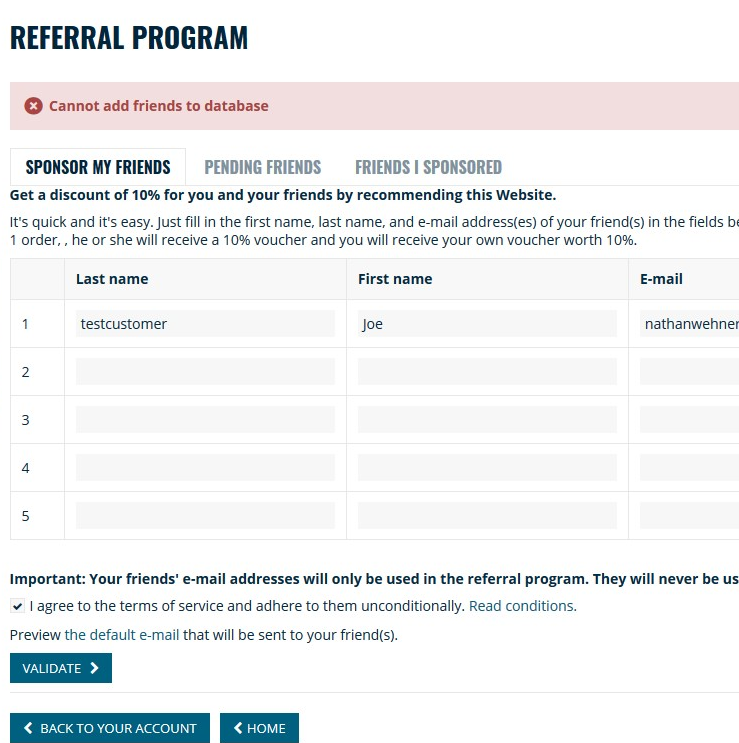
Updated the module and now getting this error.
-
I'm not aware of any specific tooling to do it. Generally, the template you use will have capability to export customizations so that you can easily import to another environment. Assuming you have a current live site running, you'd probably want to manually make the other changes to ensure it matches your development site on the subdomain.
-
Could be. The text is usually driven by your theme. I was having challenges modifying some yesterday though on the latest version of TB. Had to update the actual translation file from the server. The backend wasn't working
-
Well, I can see that it creates a voucher for the invited party when they create an account. It does now however notify the sponsor/referrer that they're referral earned them a voucher in any way, nor does it create a voucher for the referrer. The invited party is never notified that they now have a voucher, nor is it set to highlight so that they can see it. Are you getting different behavior than that?
-
Bump ... No one else having this issue?