DRMasterChief
-
Posts
797 -
Joined
-
Last visited
-
Days Won
28
DRMasterChief's Achievements






-
I just wanted to mention that our fantastic hosting provider was working from yesterday afternoon until after 2 a.m. today, constantly updating their website. They had already disabled a PHP function beforehand and informed us about it (the file upload issue), which was the first important security measure. We were kept informed live about which PHP versions had been updated and when everything was working again. They worked through the night, and all functions are available again. I find it a bit alarming, however, that such a large hosting provider as hosting.com has no information on their site and apparently hasn't implemented any fixes even today? edit: i can see in their Blog that they have updated PHP also since a few hours. In short: we can't detect any problems with ThirtyBees after the PHP fixes. Everything is fine.
-

Gewährleistungs- und Garantielabel
DRMasterChief replied to Pedalman's topic in Deutsches Forum - Generelle Fragen
DIN A4 online natürlich nicht, aber responsiv wird wohl als Stand der Technik 2026 vorausgesetzt, d.h. du musst die Grafik halt üblich für mobile Endgeräte bereitstellen und sie nicht absichtlich kleiner oder so klein machen, daß man sie nicht mehr lesen kann, bspw. also mind. 420px breit was auf gängigen Smartphones angezeigt werden kann. Suche dir ggf. auch mal Infotexte/Meinungen zu dem Thema aus anderen EU-Ländern. -
Gewährleistungs- und Garantielabel
DRMasterChief replied to Pedalman's topic in Deutsches Forum - Generelle Fragen
Hi, ich habe da so eine Vermutung.... du sagst mit dem Link ...dass dieser die Gewährleistung zur Kenntnis genommen hat... ist aber wohl egal ob das so ist oder nicht, denn die gesetzliche Forderung ist ganz simpel: du musst den Gewährleistungshinweis ANZEIGEN lassen, also als Bild, so wie es ist, ohne Veränderung. Also wäre das erstmal nicht durch einen Link möglich. IFrame u.ä. wird ebenso kritisch gesehen, denn Popup-Fenster, IFrame etc. können ja durch Blocker verhindert werden, dann wird dem Kunden der Hinweis nicht angezeigt, schuld bist du und nicht der Kunde der einen Blocker nutzt. Ob das AEUC-Modul sonst noch was dafür hergibt kann ich grade nicht beurteilen. Ich kenne das Modul nur noch von "damals" bei der Einführung und es scheint wohl eher mit heißer Nadel gestrickt zu sein. Wieviele Änderungen man da manuell macht müsste man sehen... Das ganze Thema ist nervig, wir merken es hier schon 🙂 oder man lässt es drauf ankommen, hat das Geld und kann eine Abmahung ausstehen oder beobachtet mal wie sich das die nächsten Monate entwickelt in der Rechtsprechung. Die Kunden scheint es im Checkout als Bild nicht massiv zu stören und es stellt sich ja eine gewisse Gewöhnung ein, da man es eigentlich in jedem Shop sehen wird und auch hier beim Aldi etc. > Gehe davon aus, daß du es so umsetzen musst wie in einem Geschäft. Dort muss das als ausgedruckter Zettel vor dem Kauf (also ggf. im Eingangsbereich) aushängen und tut es auch in den meisten Geschäften. Hinschauen tun da die wenigsten Kunden, aber darum gehts ja leider nicht. -
Hi, I have something like that. It includes a bit more functionality, so you can also send packages with tracking numbers to customers via "inactive" shipping providers. Currently, in the backend, you have an overview of all sent package numbers. An email is sent to the customer for each package number. The integrated (active) shipping options remain unchanged.
-
Gewährleistungs- und Garantielabel
DRMasterChief replied to Pedalman's topic in Deutsches Forum - Generelle Fragen
Hallo, ich kenne die Beispiele auch und auch die "practical Guidelines" die (leider) im Nachhinein so rausgegeben wurden. Diese sind jedoch nicht rechtsverbindlich, sondern der reine Gesetzestext der EU. Ich habe meine Infos bzw. Interpretation von etwa 6-8 beratenden Seiten von Anwaltskanzleien bzw. IHK usw., die alle darauf abzielen daß die Umsetzung zu 95% nur vollständig ist, wenn der Hinweis zur Gewährleistung "unmittelbar und deutlich vor" Kaufabschluss gezeigt wird. Ist es hinter einem Link versteckt "deutlich" sichtbar? Wir wissen es noch nicht... Ist es zwanghaft vor dem Kaufabschluss (Button jetzt kaufen) deutlich sichtbar - ja schon. Wie du schreibst, es ist da leider nichts 100% sicher bis man erste Urteile dazu hätte... also abwarten und Kaffee trinken. Wobei man auch erkennen muss, daß das Abmahnrisiko daher in dem Bereich eher gering ist (außer man hat die Labels nirgendwo). Abwarten ist also vielleicht kein Problem 🙂 Die "practical Guidelines" haben das Ganze ja noch mehr verblödet, da sie beim Gewährleistungslabel die geschachtelte Anzeige in einem Beispiel aufführen, was laut dem Gesetz nicht geht. Warum das darin so auftaucht weiß von den Anwälten auch niemand. Man könnte annehmen daß "nicht ausdrücklich erwähnt" auch "nicht ausdrücklich verboten" bedeuten kann, das ist im Rechtskontext aber eigentlich nicht der Fall. Die geschachtelte Anzeige geht nur ausdrücklich für das GARAN Label. -
Gewährleistungs- und Garantielabel
DRMasterChief replied to Pedalman's topic in Deutsches Forum - Generelle Fragen
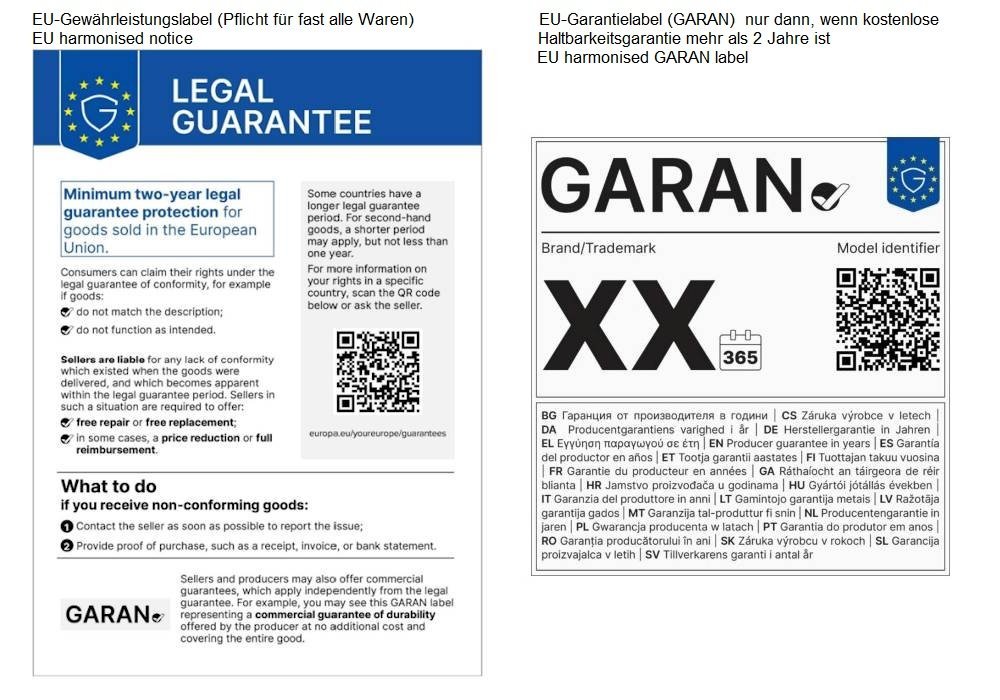
Kurz zur Klarstellung, hier als schnelle grafische Übersicht, damit wir hier sehr gerne über die technische Umsetzung weiterdiskutieren können. Es sind zwei Labels (das eine ist eigentlich eine "Mitteilung", daran erkennt man schon daß die immer erfolgen muss) die eindeutig verschiedene Zwecke und Anforderungen haben. Richtet sich das Verkaufsangebot innerhalb Deutschlands dann müssen natürlich die Labels mit deutscher Sprache genutzt werden.
-
Gewährleistungs- und Garantielabel
DRMasterChief replied to Pedalman's topic in Deutsches Forum - Generelle Fragen
Ja klar, ist auch eine gute Information. Nach derzeitigem Stand ist jedoch nur die Info in einem CMS nicht ganz so ausreichend... es muss deutlich sichtbar vor Abgabe des Kaufwillens sichtbar sein, d.h. wie man es dreht und wendet bleibt fast nur irgendein Step im Checkout übrig... Das Gewährleistungslabel darf (aktuell noch) auch nicht ausklappbar, ausgeblendet etc. sein. Wir haben die Anzeige drin direkt nach Auswahl "payment option", ergänzt mit einem kleinen Hinweis daß es eine gesetzliche Pflichtinformation ist. Ggf. verwirrt es die Kunden dann die ersten Wochen etwas weniger. Der große Unterschied ist da eben bspw. zum Garantielabel, das darf nämlich ausdrücklich (halb) ausgeblendet sein usw.... und die Angaben zur erweiterten Garantie wenn mehr als 2 Jahre müssten dann sogar im Warenkorb erscheinen und in der Bestellbestätigung sichtbar sein. Das ist dann schon mehr Aufwand. -
Gewährleistungs- und Garantielabel
DRMasterChief replied to Pedalman's topic in Deutsches Forum - Generelle Fragen
Hallo @Bird der Aufwand ist sehr unterschiedlich. Für das Gewährleistungslabel ist es relativ einfach (das ist das Label das man immer anzeigen muss und auch im stationären Handel aushängt). Für das Garantielabel (das ist auch technisch was ganz anderes als das Gewährleistungslabe), ist es schon deutlich aufwändiger es gut im Shop umzusetzen. >> Wir dürfen die Anforderungen und Technik dahinter keinesfalls vermischen 😝 - das passiert aber leider sehr häufig wenn man online unterwegs ist. (ist dir das soeben auch passiert? ) -
Hello, this is already possible (always tax-included), you have to configure all the countries in the same way including tax.
-
Gewährleistungs- und Garantielabel
DRMasterChief replied to Pedalman's topic in Deutsches Forum - Generelle Fragen
Hi, ich fand eine (ich finde coole) Möglichkeit, die Produktvarianten dazu zu nutzen, d.h. wenn ich bei einem Artikel das Garantielabel anzeigen muss, wähle ich dazu einfach die entsprechenden Varianten aus und es wird angezeigt. Varianten sind dazu angelegt bspw. in verschiedenen Sprachen und verschiedenen Angaben zur Garantiedauer (Jahre). Kein extra Modul und super flexibel, ein bisschen Code und in der Nutzung genauso viel "Aufwand" wie mit einem Modul - aber ohne Modul und Updatesicher. > können wir gerne hier weiter besprechen. Das (immer anzuzeigende) Gewährleistungslabel habe ich im letzten Schritt vom Checkout eingebaut. @Pedalman Die zwei von der EU bereitgestellten Grafiken EN und DE (oder andere Sprachen falls zutreffend) hochladen in /theme/img und dann für das Gewährleistungslabel braucht es in meinem Fall in /theme/order-payment-classic.tpl und /theme/order-payment-advanced.tpl nur folgendes (habe das nach </div> von #HOOK_PAYMENT eingefügt) : {* --- EU-Gewährleistungslabel (Pflicht ab 27.09.2026) --- *} <div class="gwl-label" style="margin:18px 0; text-align:center;"> {if $lang_iso == 'en'} <img src="{$img_dir}gewaehrleistungs-label-en.png" width="1009" height="1427" alt="EU guarantee of conformity label: information about your statutory rights" style="display:inline-block; width:100%; max-width:420px; height:auto;" /> {else} <img src="{$img_dir}gewaehrleistungs-label-de.png" width="1009" height="1427" alt="EU-Gewährleistungslabel: Informationen zu Ihren gesetzlichen Gewährleistungsrechten" style="display:inline-block; width:100%; max-width:420px; height:auto;" /> {/if} </div> {* --- Ende Gewährleistungslabel --- *} -
schema.org / Breadcrumbs - Deutsches Forum - Generelle Fragen - thirty bees forum @Pedalman
-
Looking for a Reliable Bulk Email Service Provider for Thirty Bees Store
DRMasterChief replied to Harry29's topic in SEO
It is mostly B2C, going to Outlook, Live and Hotmail ...which is certainly used by many private individuals. The services involved in this context are truly terrible. As soon as the word order appears in a message, it seems to get flagged as spam - which naturally makes things difficult for an online shop. It makes no sense, either, because there are technical ways to identify emails as legitimate rather than spam (DMARC, SPF, DKIM) - and we have implemented all of these correctly, of course, but Microsoft simply doesn't care. Whitelisting has to go through the provider; they are aware of the issue and are actively working on it, but even if the block is lifted, it can take up to three weeks. It’s not an ideal situation for us. Now we have Brevo since a few weeks and it works 🙂 -
Looking for a Reliable Bulk Email Service Provider for Thirty Bees Store
DRMasterChief replied to Harry29's topic in SEO
Thanks for the additional info; things are much clearer to me now. 👍 That said, we never sent attachments or anything like that, but naturally, a lot of "suspicious words" do crop up in customer communications—terms like "order," "online shop," and so on—which likely get flagged as spam. At times, it’s almost impossible to send emails to Microsoft services; sometimes they just vanish into thin air without an error message—they don't even end up in the recipient's spam folder. It’s pretty outrageous... and then you have to deal with a lot of—often not-so-friendly—inquiries asking about the status of orders and the like. We have a high volume of transactional and service-related emails to handle. We now manage 100% of that via Brevo. We don't do much marketing, and when we do, we use dedicated newsletter services that don't run through our own domain. -
Looking for a Reliable Bulk Email Service Provider for Thirty Bees Store
DRMasterChief replied to Harry29's topic in SEO
Sorry, i can´t understand your idea about this? pls. explain it for me 🙂 We are experiencing major difficulties with direct emails sent from our provider to Hotmail/MS services, GMX, etc., as a large volume of them are being marked as spam. That was our main reason for choosing Brevo. -
Looking for a Reliable Bulk Email Service Provider for Thirty Bees Store
DRMasterChief replied to Harry29's topic in SEO
but it is not the cheapest one for a smaller shop, brevo has up to a lot of mails/day for free and is on of the best services.