
DRMasterChief
-
Posts
797 -
Joined
-
Last visited
-
Days Won
28
Content Type
Profiles
Forums
Gallery
Downloads
Articles
Store
Blogs
Everything posted by DRMasterChief
-
I just wanted to mention that our fantastic hosting provider was working from yesterday afternoon until after 2 a.m. today, constantly updating their website. They had already disabled a PHP function beforehand and informed us about it (the file upload issue), which was the first important security measure. We were kept informed live about which PHP versions had been updated and when everything was working again. They worked through the night, and all functions are available again. I find it a bit alarming, however, that such a large hosting provider as hosting.com has no information on their site and apparently hasn't implemented any fixes even today? edit: i can see in their Blog that they have updated PHP also since a few hours. In short: we can't detect any problems with ThirtyBees after the PHP fixes. Everything is fine.
-

Gewährleistungs- und Garantielabel
DRMasterChief replied to Pedalman's topic in Deutsches Forum - Generelle Fragen
DIN A4 online natürlich nicht, aber responsiv wird wohl als Stand der Technik 2026 vorausgesetzt, d.h. du musst die Grafik halt üblich für mobile Endgeräte bereitstellen und sie nicht absichtlich kleiner oder so klein machen, daß man sie nicht mehr lesen kann, bspw. also mind. 420px breit was auf gängigen Smartphones angezeigt werden kann. Suche dir ggf. auch mal Infotexte/Meinungen zu dem Thema aus anderen EU-Ländern. -
Gewährleistungs- und Garantielabel
DRMasterChief replied to Pedalman's topic in Deutsches Forum - Generelle Fragen
Hi, ich habe da so eine Vermutung.... du sagst mit dem Link ...dass dieser die Gewährleistung zur Kenntnis genommen hat... ist aber wohl egal ob das so ist oder nicht, denn die gesetzliche Forderung ist ganz simpel: du musst den Gewährleistungshinweis ANZEIGEN lassen, also als Bild, so wie es ist, ohne Veränderung. Also wäre das erstmal nicht durch einen Link möglich. IFrame u.ä. wird ebenso kritisch gesehen, denn Popup-Fenster, IFrame etc. können ja durch Blocker verhindert werden, dann wird dem Kunden der Hinweis nicht angezeigt, schuld bist du und nicht der Kunde der einen Blocker nutzt. Ob das AEUC-Modul sonst noch was dafür hergibt kann ich grade nicht beurteilen. Ich kenne das Modul nur noch von "damals" bei der Einführung und es scheint wohl eher mit heißer Nadel gestrickt zu sein. Wieviele Änderungen man da manuell macht müsste man sehen... Das ganze Thema ist nervig, wir merken es hier schon 🙂 oder man lässt es drauf ankommen, hat das Geld und kann eine Abmahung ausstehen oder beobachtet mal wie sich das die nächsten Monate entwickelt in der Rechtsprechung. Die Kunden scheint es im Checkout als Bild nicht massiv zu stören und es stellt sich ja eine gewisse Gewöhnung ein, da man es eigentlich in jedem Shop sehen wird und auch hier beim Aldi etc. > Gehe davon aus, daß du es so umsetzen musst wie in einem Geschäft. Dort muss das als ausgedruckter Zettel vor dem Kauf (also ggf. im Eingangsbereich) aushängen und tut es auch in den meisten Geschäften. Hinschauen tun da die wenigsten Kunden, aber darum gehts ja leider nicht. -
Hi, I have something like that. It includes a bit more functionality, so you can also send packages with tracking numbers to customers via "inactive" shipping providers. Currently, in the backend, you have an overview of all sent package numbers. An email is sent to the customer for each package number. The integrated (active) shipping options remain unchanged.
-
Gewährleistungs- und Garantielabel
DRMasterChief replied to Pedalman's topic in Deutsches Forum - Generelle Fragen
Hallo, ich kenne die Beispiele auch und auch die "practical Guidelines" die (leider) im Nachhinein so rausgegeben wurden. Diese sind jedoch nicht rechtsverbindlich, sondern der reine Gesetzestext der EU. Ich habe meine Infos bzw. Interpretation von etwa 6-8 beratenden Seiten von Anwaltskanzleien bzw. IHK usw., die alle darauf abzielen daß die Umsetzung zu 95% nur vollständig ist, wenn der Hinweis zur Gewährleistung "unmittelbar und deutlich vor" Kaufabschluss gezeigt wird. Ist es hinter einem Link versteckt "deutlich" sichtbar? Wir wissen es noch nicht... Ist es zwanghaft vor dem Kaufabschluss (Button jetzt kaufen) deutlich sichtbar - ja schon. Wie du schreibst, es ist da leider nichts 100% sicher bis man erste Urteile dazu hätte... also abwarten und Kaffee trinken. Wobei man auch erkennen muss, daß das Abmahnrisiko daher in dem Bereich eher gering ist (außer man hat die Labels nirgendwo). Abwarten ist also vielleicht kein Problem 🙂 Die "practical Guidelines" haben das Ganze ja noch mehr verblödet, da sie beim Gewährleistungslabel die geschachtelte Anzeige in einem Beispiel aufführen, was laut dem Gesetz nicht geht. Warum das darin so auftaucht weiß von den Anwälten auch niemand. Man könnte annehmen daß "nicht ausdrücklich erwähnt" auch "nicht ausdrücklich verboten" bedeuten kann, das ist im Rechtskontext aber eigentlich nicht der Fall. Die geschachtelte Anzeige geht nur ausdrücklich für das GARAN Label. -
Gewährleistungs- und Garantielabel
DRMasterChief replied to Pedalman's topic in Deutsches Forum - Generelle Fragen
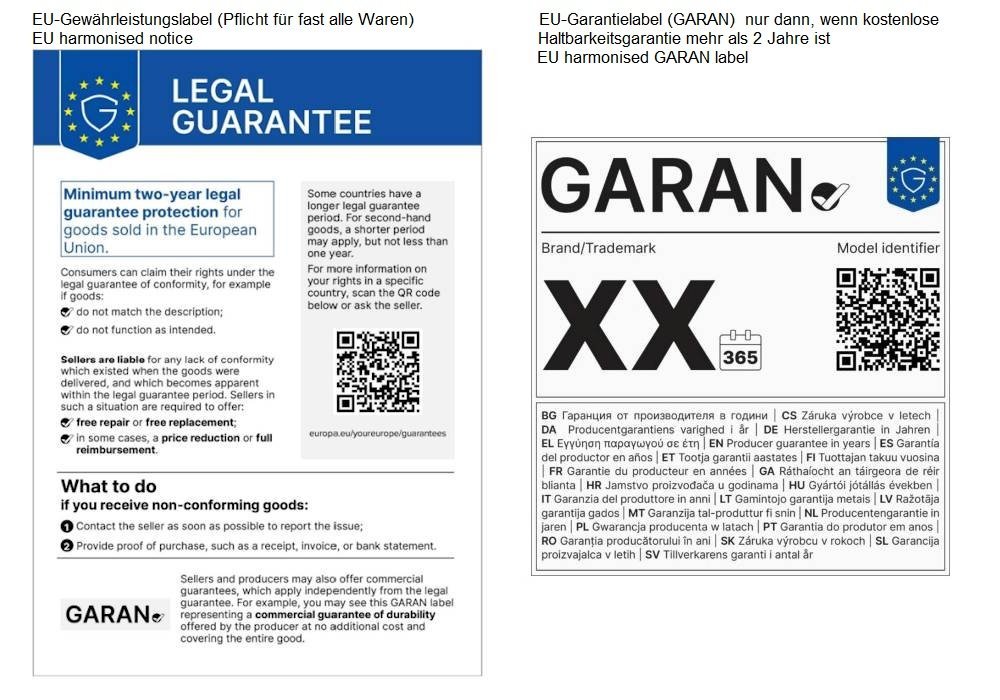
Kurz zur Klarstellung, hier als schnelle grafische Übersicht, damit wir hier sehr gerne über die technische Umsetzung weiterdiskutieren können. Es sind zwei Labels (das eine ist eigentlich eine "Mitteilung", daran erkennt man schon daß die immer erfolgen muss) die eindeutig verschiedene Zwecke und Anforderungen haben. Richtet sich das Verkaufsangebot innerhalb Deutschlands dann müssen natürlich die Labels mit deutscher Sprache genutzt werden.
-
Gewährleistungs- und Garantielabel
DRMasterChief replied to Pedalman's topic in Deutsches Forum - Generelle Fragen
Ja klar, ist auch eine gute Information. Nach derzeitigem Stand ist jedoch nur die Info in einem CMS nicht ganz so ausreichend... es muss deutlich sichtbar vor Abgabe des Kaufwillens sichtbar sein, d.h. wie man es dreht und wendet bleibt fast nur irgendein Step im Checkout übrig... Das Gewährleistungslabel darf (aktuell noch) auch nicht ausklappbar, ausgeblendet etc. sein. Wir haben die Anzeige drin direkt nach Auswahl "payment option", ergänzt mit einem kleinen Hinweis daß es eine gesetzliche Pflichtinformation ist. Ggf. verwirrt es die Kunden dann die ersten Wochen etwas weniger. Der große Unterschied ist da eben bspw. zum Garantielabel, das darf nämlich ausdrücklich (halb) ausgeblendet sein usw.... und die Angaben zur erweiterten Garantie wenn mehr als 2 Jahre müssten dann sogar im Warenkorb erscheinen und in der Bestellbestätigung sichtbar sein. Das ist dann schon mehr Aufwand. -
Gewährleistungs- und Garantielabel
DRMasterChief replied to Pedalman's topic in Deutsches Forum - Generelle Fragen
Hallo @Bird der Aufwand ist sehr unterschiedlich. Für das Gewährleistungslabel ist es relativ einfach (das ist das Label das man immer anzeigen muss und auch im stationären Handel aushängt). Für das Garantielabel (das ist auch technisch was ganz anderes als das Gewährleistungslabe), ist es schon deutlich aufwändiger es gut im Shop umzusetzen. >> Wir dürfen die Anforderungen und Technik dahinter keinesfalls vermischen 😝 - das passiert aber leider sehr häufig wenn man online unterwegs ist. (ist dir das soeben auch passiert? ) -
Hello, this is already possible (always tax-included), you have to configure all the countries in the same way including tax.
-
Gewährleistungs- und Garantielabel
DRMasterChief replied to Pedalman's topic in Deutsches Forum - Generelle Fragen
Hi, ich fand eine (ich finde coole) Möglichkeit, die Produktvarianten dazu zu nutzen, d.h. wenn ich bei einem Artikel das Garantielabel anzeigen muss, wähle ich dazu einfach die entsprechenden Varianten aus und es wird angezeigt. Varianten sind dazu angelegt bspw. in verschiedenen Sprachen und verschiedenen Angaben zur Garantiedauer (Jahre). Kein extra Modul und super flexibel, ein bisschen Code und in der Nutzung genauso viel "Aufwand" wie mit einem Modul - aber ohne Modul und Updatesicher. > können wir gerne hier weiter besprechen. Das (immer anzuzeigende) Gewährleistungslabel habe ich im letzten Schritt vom Checkout eingebaut. @Pedalman Die zwei von der EU bereitgestellten Grafiken EN und DE (oder andere Sprachen falls zutreffend) hochladen in /theme/img und dann für das Gewährleistungslabel braucht es in meinem Fall in /theme/order-payment-classic.tpl und /theme/order-payment-advanced.tpl nur folgendes (habe das nach </div> von #HOOK_PAYMENT eingefügt) : {* --- EU-Gewährleistungslabel (Pflicht ab 27.09.2026) --- *} <div class="gwl-label" style="margin:18px 0; text-align:center;"> {if $lang_iso == 'en'} <img src="{$img_dir}gewaehrleistungs-label-en.png" width="1009" height="1427" alt="EU guarantee of conformity label: information about your statutory rights" style="display:inline-block; width:100%; max-width:420px; height:auto;" /> {else} <img src="{$img_dir}gewaehrleistungs-label-de.png" width="1009" height="1427" alt="EU-Gewährleistungslabel: Informationen zu Ihren gesetzlichen Gewährleistungsrechten" style="display:inline-block; width:100%; max-width:420px; height:auto;" /> {/if} </div> {* --- Ende Gewährleistungslabel --- *} -
schema.org / Breadcrumbs - Deutsches Forum - Generelle Fragen - thirty bees forum @Pedalman
-
Looking for a Reliable Bulk Email Service Provider for Thirty Bees Store
DRMasterChief replied to Harry29's topic in SEO
It is mostly B2C, going to Outlook, Live and Hotmail ...which is certainly used by many private individuals. The services involved in this context are truly terrible. As soon as the word order appears in a message, it seems to get flagged as spam - which naturally makes things difficult for an online shop. It makes no sense, either, because there are technical ways to identify emails as legitimate rather than spam (DMARC, SPF, DKIM) - and we have implemented all of these correctly, of course, but Microsoft simply doesn't care. Whitelisting has to go through the provider; they are aware of the issue and are actively working on it, but even if the block is lifted, it can take up to three weeks. It’s not an ideal situation for us. Now we have Brevo since a few weeks and it works 🙂 -
Looking for a Reliable Bulk Email Service Provider for Thirty Bees Store
DRMasterChief replied to Harry29's topic in SEO
Thanks for the additional info; things are much clearer to me now. 👍 That said, we never sent attachments or anything like that, but naturally, a lot of "suspicious words" do crop up in customer communications—terms like "order," "online shop," and so on—which likely get flagged as spam. At times, it’s almost impossible to send emails to Microsoft services; sometimes they just vanish into thin air without an error message—they don't even end up in the recipient's spam folder. It’s pretty outrageous... and then you have to deal with a lot of—often not-so-friendly—inquiries asking about the status of orders and the like. We have a high volume of transactional and service-related emails to handle. We now manage 100% of that via Brevo. We don't do much marketing, and when we do, we use dedicated newsletter services that don't run through our own domain. -
Looking for a Reliable Bulk Email Service Provider for Thirty Bees Store
DRMasterChief replied to Harry29's topic in SEO
Sorry, i can´t understand your idea about this? pls. explain it for me 🙂 We are experiencing major difficulties with direct emails sent from our provider to Hotmail/MS services, GMX, etc., as a large volume of them are being marked as spam. That was our main reason for choosing Brevo. -
Looking for a Reliable Bulk Email Service Provider for Thirty Bees Store
DRMasterChief replied to Harry29's topic in SEO
but it is not the cheapest one for a smaller shop, brevo has up to a lot of mails/day for free and is on of the best services. -
Just to complete this here, maybe use the thirtybees 2FA module: https://store.getdatakick.com/en/modules/back-office-two-factor-authentication I'm very interested in this topic right now and would like to implement something related to it. I think "hardening" the admin login is an important matter.
-
Two factor authentication for thirtybees
DRMasterChief replied to António Moreira's question in Theme help
Just to complete this here, maybe better use the thirtybees module: https://store.getdatakick.com/en/modules/back-office-two-factor-authentication I'm very interested in this topic right now and would like to implement something related to it. I think "hardening" the admin login is an important matter. -
[Bug] Order created with €0.00 shipping after PayPal payment when customer adds/changes a delivery address mid-checkout — root cause traced to Cart::updateAddressId() Summary When a customer adds or changes their delivery address during checkout and pays via PayPal (Website Payments Plus / "plussubmit" flow), PayPal correctly charges the full amount including shipping — but the Order that gets created in thirty bees shows €0.00 shipping, and this incorrect value is also what appears in the back-office order view and the admin notification email. I traced this through the actual module and core code (thirty bees 1.x, modules/paypal — the classic module, not tbpaypalcheckout) and found what looks like a genuine core bug in Cart::updateAddressId(), not something PayPal-module-specific — PayPal's redirect-based flow just happens to be a reliable way to trigger it. Real-world data (anonymized shop, values otherwise unmodified) id_cart: 8659 id_address_delivery on the cart: 27116 delivery_option on the cart (raw JSON): {"27115":"174,"} id_carrier on the cart: 174 ("Worldwide", weight-tiered pricing, includes Asia zone) Delivery country: Kazakhstan (Asia zone) PayPal charged: correct total, shipping included Resulting Order: total_shipping = 0, admin notification email also shows no shipping line Note the address ID mismatch: 27115 (key in delivery_option) vs 27116 (actual id_address_delivery) — a difference of exactly 1, consistent with a new/duplicate address record having just been created during checkout. Steps to reproduce (best guess based on the trace below — not yet lab-confirmed) Customer has an existing address, or starts checkout normally Customer adds a new delivery address during checkout (e.g. a second address for a different country) Customer pays via PayPal Website Payments Plus (redirects to PayPal, then returns) Order is created with total_shipping = 0, despite PayPal having charged the correct amount What I ruled out first My first suspicion was this hardcoded value in modules/paypal/controllers/front/plussubmit.php, inside displayAjax(): $transaction = [ 'id_transaction' => $payment->transactions[0]->related_resources[0]->sale->id, 'payment_status' => $payment->state, 'total_paid' => $payment->transactions[0]->amount->total, 'id_invoice' => 0, 'shipping' => 0, // <-- hardcoded, always zero 'currency' => $payment->transactions[0]->amount->currency, 'payment_date' => date("Y-m-d H:i:s"), ]; This looked like a smoking gun, but tracing it through PayPal::validateOrder() → parent::validateOrder() (core PaymentModule::validateOrder()) shows the $transaction/$extra_vars array is only used for transaction_id (via $order->addOrderPayment($amount_paid, null, $transaction_id)). It is not used anywhere to compute or set total_shipping. So this hardcoded 0 doesn't feed into the actual Order's shipping value — it's dead/misleading, but not the root cause of this symptom. (It is passed to PayPalOrder::saveOrder() right after, into the module's own paypal_order tracking table used for refunds — so it may be worth fixing separately, since refund calculations reading from that table would see a wrong shipping value there. But that's a secondary finding, not the main bug.) The actual root cause: Cart::updateAddressId() never touches delivery_option classes/Cart.php: public function updateAddressId($idAddress, $idAddressNew) { $toUpdate = false; if (!isset($this->id_address_invoice) || $this->id_address_invoice == $idAddress) { $toUpdate = true; $this->id_address_invoice = $idAddressNew; } if (!isset($this->id_address_delivery) || $this->id_address_delivery == $idAddress) { $toUpdate = true; $this->id_address_delivery = $idAddressNew; } if ($toUpdate) { $this->update(); } $conn = Db::getInstance(); $conn->update('cart_product', ['id_address_delivery' => (int) $idAddressNew], '`id_cart` = '.(int) $this->id.' AND `id_address_delivery` = '.(int) $idAddress); $conn->update('customization', ['id_address_delivery' => (int) $idAddressNew], '`id_cart` = '.(int) $this->id.' AND `id_address_delivery` = '.(int) $idAddress); } This method correctly rewrites the address ID everywhere else on the cart — id_address_delivery, id_address_invoice, cart_product.id_address_delivery, customization.id_address_delivery — except in $this->delivery_option, the JSON field that maps {id_address: chosen_delivery_option_key}. That field is never read, updated, or cleared here, so it keeps pointing at the old address ID indefinitely. How that stale key produces exactly €0.00 downstream Two places in Cart.php are affected once delivery_option references an address ID that no longer matches the cart's current delivery address: 1. getDeliveryOption() (validates the stored option against a freshly-computed, currently-keyed list): if (isset($this->delivery_option) && $this->delivery_option != '') { $deliveryOption = json_decode($this->delivery_option, true); $validated = true; if (is_array($deliveryOption)) { foreach ($deliveryOption as $idAddress => $key) { if (!isset($deliveryOptionList[$idAddress][$key])) { // fails: '27115' isn't a key anymore $validated = false; break; } } if ($validated) { ... } } } // falls through to auto-select logic when $validated is false Since $deliveryOptionList is freshly built and keyed by the current delivery address, the stale key (27115) is never found, validation fails, and the method falls into its "no valid option, pick the best automatically" branch — silently discarding whatever the customer actually chose. 2. getTotalShippingCost() (if a stale $deliveryOption array is passed in explicitly rather than recomputed): foreach ($deliveryOption as $idAddress => $key) { if (!isset($deliveryOptionList[$idAddress]) || !isset($deliveryOptionList[$idAddress][$key])) { continue; // silently contributes nothing for this address } $totalShipping += ...; } If the stale, old-address-keyed array reaches this method directly, the mismatch causes a silent continue rather than a fallback or an error — and since there's nothing else to add, $totalShipping stays exactly 0. This maps very cleanly onto the observed exact-zero result. I also checked whether address changes flush the other, Cache::store()-backed cache that getDeliveryOptionList() uses (Cart::getDeliveryOptionList_{id_cart}_{country_id}) — I found no Cache::clean() call anywhere in Cart.php targeting that key, while other caches (getCartRules_*, getContextualValue_*) are explicitly cleaned elsewhere. I haven't fully confirmed whether this contributes as well, but it's consistent with the same general pattern: address-dependent state isn't being kept in sync when the address itself changes. Why PayPal (and likely other redirect-based payment modules) surfaces this This isn't PayPal-specific in root cause, but redirect-based payment flows are a reliable way to trigger it: the customer can add/change an address, get redirected off-site to PayPal, and return — by the time the order is validated, enough has happened for the stale delivery_option reference to matter. This lines up with an existing, official PrestaShop core issue that's architecturally very similar: PrestaShop/PrestaShop#16864 — "Cart::getDeliveryOption() method with a payment module" — reports that for payment modules requiring an external redirect, the selected carrier gets silently redefined after payment, and traces it to Cart::getDeliveryOption()'s $useCache parameter defaulting to true while PaymentModule::validateOrder() never overrides it. That issue is filed against PrestaShop 1.7, but the exact same method signature and the exact same "no delivery option selected or not valid, get the better for all options" fallback logic exists identically in PrestaShop 1.5, 1.6, and in thirty bees' own Cart.php — so it's plausible both issues are two symptoms of the same general fragility around address/delivery-option consistency across a redirect. Possibly related existing issues on thirtybees/paypal None of these match exactly, but they share the same general shape — a mismatch between what's calculated/shown and what actually gets saved: #26 — "PayPal instant checkout doesn't import address from PP if customer is logged in to TB and has an address in TB (but suggests order will be sent to paypal address anyway)" #40 — "Paypal Checkout: Error reported due to apparently separated taxes (?)" #37 — "Server error if refreshing payments plus confirmation page" (same Plus confirmation code path as this report) Suggested fix (for whoever picks this up) @datakick The cleanest fix is probably in Cart::updateAddressId() itself: when $idAddress is being replaced by $idAddressNew, also rewrite (or simply clear) the corresponding key in $this->delivery_option, e.g.: if ($this->delivery_option != '') { $deliveryOption = json_decode($this->delivery_option, true); if (is_array($deliveryOption) && isset($deliveryOption[$idAddress])) { $deliveryOption[$idAddressNew] = $deliveryOption[$idAddress]; unset($deliveryOption[$idAddress]); $this->delivery_option = json_encode($deliveryOption); $toUpdate = true; } } (Untested — just illustrating the idea; whoever fixes this should verify against the exact key format used elsewhere, e.g. getIdCarrierFromDeliveryOption().) Clearing it entirely (forcing a fresh auto-selection) would also work and is simpler, at the cost of not necessarily preserving the customer's original explicit choice. Separately, modules/paypal/controllers/front/plussubmit.php's hardcoded 'shipping' => 0 in the $transaction array is misleading dead weight and worth removing/fixing independently, since it's saved into paypal_order and could affect refund-related calculations that read from that table. Environment thirty bees 1.x modules/paypal (classic module — I understand tbpaypalcheckout is a newer, actively developed replacement; worth checking whether it has the same Cart::updateAddressId() exposure, since the root cause is in core, not in the PayPal module itself) PHP 8.1+ Payment method: PayPal Website Payments Plus ("plussubmit" flow specifically — haven't tested Express Checkout or standard PayPal for the same symptom) Impact Orders silently ship for free when they shouldn't. Not a security issue, but a real, silent revenue-loss bug — no error is thrown, nothing appears in logs, the order just looks normal except for the missing shipping line. Happy to provide more detail, the full Cart.php/plussubmit.php/paypal.php excerpts I traced this from, or test a patch if someone wants to attempt a fix. It would also be good if someone volunteered to submit this as a GitHub request. I can't do it myself. Please give feedback here whenever this is done. paypal-shipping-bug-report.md
-
An up-to-date PayPal module would obviously be a huge deal 👍 We use the instant payment method, not "funds on hold." We also don't offer installment payments or payment on invoice via PayPal.
-
I’m not using the Warehouse theme, but something else. I’ve started a new thread for a module that should work with any theme.
-
Ich wollte das Thema schema.org / Breadcrumbs noch einmal aufgreifen. Dabei bin ich auf das alte JSON-Modul von 2024 gestoßen (es wird scheinbar nicht mehr weiterentwickelt). Ich bin auf diesem Gebiet kein Experte – SEO und Ähnliches haben für uns bislang keine große Rolle gespielt. Ist das ein Thema, das die Shopbetreiber hier interessiert, oder wie geht ihr damit um? Ich habe dafür ein Modul entwickelt, das die von Google geforderten Pflichtfelder einwandfrei übermittelt.
-
wir sind hier ja im deutschen Forum: Ich wollte das Thema Breadcrumbs noch einmal aufgreifen. Dabei bin ich auf das alte JSON-Modul von 2024 gestoßen (es wird nicht mehr weiterentwickelt). Ich bin auf diesem Gebiet kein Experte – SEO und Ähnliches haben für uns bislang keine große Rolle gespielt. Ist das ein Thema, das die Shopbetreiber hier interessiert, oder wie geht ihr damit um? Ich habe dafür ein Modul entwickelt, das die von Google geforderten Pflichtfelder einwandfrei übermittelt. I wanted to revisit the topic of breadcrumbs. In doing so, I came across the old JSON module from 2024 (which is no longer being developed). I’m no expert in this area—SEO and the like haven't played a major role for us so far. Is this a topic that interests the shop owners here, or how do you handle it? I’ve developed a module for this that flawlessly transmits the mandatory fields required by Google.
-
To remove the gender (social title) field from the customer registration form in thirty bees, you must edit your active theme’s Smarty template file (identity.tpl or authentication.tpl), as thirty bees does not feature a single toggle switch for this in the back office. Editing the Theme Template File: Open your site files via FTP or your hosting file manager. Go to your active theme directory: /themes/your-theme/templates/customer/ or /themes/your-theme/ depending on your specific theme structure. Look for files related to customer registration and account creation, primarily authentication.tpl, identity.tpl, or order-opc-new-account.tpl (and/or also removing the sections from files order-opc-new-account.tpl and order-opc-new-account-advanced.tpl, override/controllers/front/AuthController.php) Find the block of code handling the gender radio buttons or select dropdown, which usually looks like: smarty<div class="clearfix"> <label>{l s='Social title'}</label> <!-- gender radio buttons code --> </div> Comment out or delete this section from the files. Clear your thirty bees compilation cache under Advanced Parameters > Performance in your back office so the template changes appear live. You can also do a search in database e.g. like this: ALTER TABLE `ps_customer` DROP COLUMN `id_gender`; ALTER TABLE `ps_address` DROP COLUMN `id_gender`; to find all files. We have deleted it since a few years, it is hardcoded in our theme and deleted, no problems but i do not have a good Readme about this 🙂 and this one: Warehouse Theme Working - Page 3 - Theme Compatibility - thirty bees forum
-
maybe the best way in this situation to get off all the rubbish 🙂 well done!
-
Since yesterday/today, there has been a notification regarding an update for the PayPal module. When you update it, you get a message stating that it is outdated/deprecated. Okay team @Acer, it’s time for more information. PayPal is extremely widespread and used by practically every merchant and customer alike. How do we proceed?