datakick
-
Posts
3,166 -
Joined
-
Last visited
-
Days Won
507
Content Type
Profiles
Forums
Gallery
Downloads
Articles
Store
Blogs
Everything posted by datakick
-
Something must be different. I just tested this on community-theme-default on my local installation and it works properly.
-
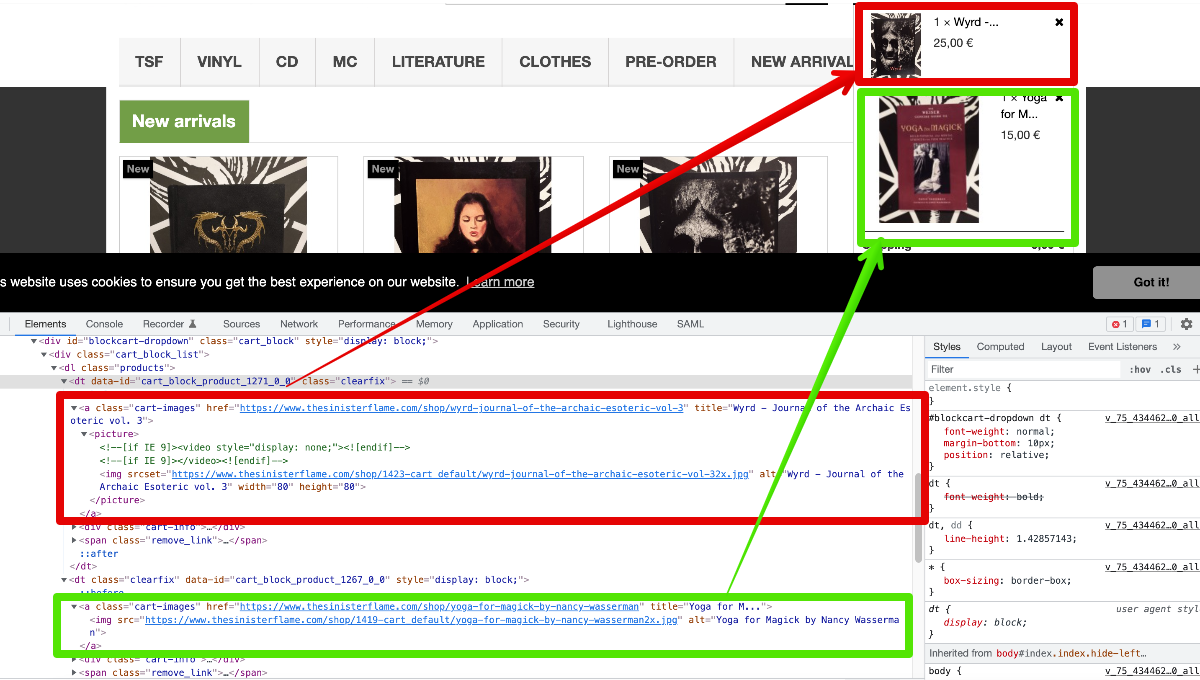
Here you can see the differences in HTML markup created by template (red) and javascript (green). You need to modify one of them to match the other:

-
This is theme issue. The HTML inside cat block can be either created dynamically on client side using javascript after the ajax call(file ajax-cart.js), or directly on your server during standard full-page load, using template blockcart.tpl. I assume your theme modified one of these two approaches (either js or template), so it's a little bit weird. You should investigate, and either revert the change, or modify the other display method accordingly.
-
Core updater : Ajax request failed: parsererror (SyntaxError)
datakick replied to jjTony's question in Updating thirty bees
Disable error reporting in your php settings. -
1.3 installation: Table 'xxxx_attribute' doesn't exist
datakick replied to led24ee's question in Bug Reports
It's specified in the system requirements: PHP 5.6 - PHP 7.4 with a minimum of 128 MiB RAM I guess it is a good idea to add a runtime check into the application, though. To prevent even starting thirtybees / installation process on non-compatible php version. We plan for 2 releases per year. The next one will be out in about 5 months. I can't promise that the php8 support will be part of it, though. It's not an easy task, considering we want to keep system compatible. The problem is that php8 comes with new reserved class name 'Attribute', but thirty bees / prestashop used this name for years already. Prestashop solved this problem by simply renaming the class in the core, so it's no longer named Attribute. The problem is that this does not fixes issues with any modules that might be using this standard class. We want to come up with a slightly better solution, but it's also little bit complicated to implement. -
1.3 installation: Table 'xxxx_attribute' doesn't exist
datakick replied to led24ee's question in Bug Reports
TB is not compatible with PHP 8 yet. The work on compatiblity is in progress, though. Hopefully the next version 1.4 will be fully php8 compatible. Until then, php 7.4 it is. -
Exporting all details from all orders using SQL
datakick replied to Minimonkay's topic in Tips and Tricks
Customer data are exposed. Customer service messages aren't. For some reason, order notes are stored as a customer service message/thread. -
I'm very sure that one more http header in response will not have any measureable impact on store speed. It can have a huge (positive) impact on store security, though.
-
Exporting all details from all orders using SQL
datakick replied to Minimonkay's topic in Tips and Tricks
SELECT d.id_order, os.name AS payment, d.product_name, d.product_reference, d.product_price, d.product_quantity, o.payment, o.date_upd, CONCAT_WS(' ', g.firstname, g.lastname) AS Customer_name, g.id_customer AS CustomerID, CONCAT_WS(' ', ad.address1, ad.address2, ad.city, ad.postcode, ad.other, 'Mobile: ', ad.phone_mobile) AS Delivery_Address, CONCAT_WS(' ', ai.address1, ai.address2, ai.city, ai.postcode, ai.other, 'Mobile: ', ai.phone_mobile) AS Invoice_Address, gl.name AS group_name, s.quantity AS quantity_in_stock, g.email FROM order_detail d LEFT JOIN orders o ON (d.id_order = o.id_order) LEFT JOIN address ad ON (o.id_address_delivery = ad.id_address) LEFT JOIN address ai ON (o.id_address_invoice = ai.id_address) LEFT JOIN stock_available s ON (d.product_id = s.id_product) LEFT JOIN customer g ON (o.id_customer = g.id_customer) LEFT JOIN group_lang gl ON (g.id_default_group = gl.id_group) AND gl.name LIKE 'piiri%' LEFT JOIN order_state_lang os ON (o.current_state = os.id_order_state) WHERE os.id_lang = 1 The tables that are causing you issues are group_lang and stock_available. Table group_lang has compound primary key (`id_group`,`id_lang`), but you join in only using gl.id_group. You need to include language condition as well: LEFT JOIN group_lang gl ON (g.id_default_group = gl.id_group and gl.id_lang = 1) Stock available is more complicated. Depending on you multistore setup, there can be a lot of entries for each product. First of all, for every combination there is a separate entry, and there is also an entry for combination with id = 0. If you use multistore, and each store has it's own quantity, then there are other records identified by id_shop or id_shop_group as well. If you don't use multistore, then you should just add id_product_attribute into the join clause: LEFT JOIN stock_available s ON (d.product_id = s.id_product AND s.id_product_attribute = d.product_attribute_id) Alternatively, you can get rid of this table from the 'FROM', and use subquery. Instead of s.quantity AS quantity_in_stock, you would put this expression instead (and remove LEFT JOIN stock_available s ON from FROM clause): // this to calculate quantity for product (SELECT sum(s.quantity) FROM stock_available s WHERE d.product_id = s.id_product) as quantity_in_stock // or this to calculate quantity available per combination (SELECT sum(s.quantity) FROM stock_available s WHERE d.product_id = s.id_product AND s.id_product_attribute = d.product_attribute_id) as quantity_in_stock -
You can define you own order status in Orders > Statuses
-
The api server was down. Please try again
-
Change terms of service on checkout to link not pop up
datakick replied to Irwin Blake ltd's question in Technical help
There are other features that require iframe, such as quick view. Third party modules might need it as well. Your server admins should definitely be able to change it. If they are unable, I would consider changing hosting provider. -
Change terms of service on checkout to link not pop up
datakick replied to Irwin Blake ltd's question in Technical help
This is unnecessary strict server settings. You should reconfigure your server to allow SAMEORIGIN for x-frame-options header. Your server currently returns X-Frame-Options => DENY -
There is a slight difference in how Configuration Information and CoreUpdater calculates changes. In this particular case, I believe Configuration Information is more correct -- the scripts in /vendor/bin/ directory should not be part of the installation pack.
-
No, this is not supported. You can disable ordering out-of-stock items, but they are still displayed in categories. You can either edit your theme, and simply omit out-of-stock items from listing periodically run SQL update query to hide products that are out of stock. Something like this might work (please test) UPDATE tb_product_shop SET visibility = 'none' WHERE (SELECT SUM(quantity) FROM tb_stock_available sa WHERE sa.id_product = tb_product_shop.id_product) <= 0;
-
Q For Devs: Any Progress on Combination Prices with Group Discounts?
datakick replied to oliiix's question in Bug Reports
No progress on this particular front. Even if this was fixed, your theme would need to be adjusted to take advantage of the data newly provided by the core. -
It's possible, but very hard to do. A lot of overrides would be needed - at least Dispatcher, Language, Link. Probably more.
-
Product list BO with manufacturers and suppliers columns
datakick replied to zimmer-media's topic in Tips and Tricks
default -
The principal of least surprise, one of the building blocks of UX. Everyone expects language selector in upper right corner. If you place it anywhere else, you will surprise your visitors. Most will never look into the footer when searching for this functionality.
-
There you go. There you go. Looks like you have copied AdminProductsController.php to override/controllers/admin directory sometimes in the past, modified it slightly, and forgot about it. I suggest you delete this file. You should also investigate what it was that you modified, but I don't see many changes in the file.
- 8 replies
-
- 1
-

-
- feature values
- data loss
- (and 1 more)
-
I agree that regular hotfix releases should exists. When I say hotfix, I don't really mean bugfix release. I mean release that fixes those issues that were introduced in the last release only. And only those issues, for which fix is very well understood and the confidence level is very high. There is not many such issues. Since 1.3.0, there were exactly 3 commits like that: https://github.com/thirtybees/thirtybees/compare/1.3.0...1.3.x , four lines in total. Why not include other bugfixes into such release as well? Well, because it comes with potential of creating more problems, mostly because of the non-linearity of the codebase. Even if the fix/commit seems safe, it might not be safe for cherry-picking to different branch. For example, imagine this one line fix in main branch $price = (float)Tools::getValue('price'); to $price = Tools::getNumberValue('price'); On the first glance, it looks quite safe to cherry pick and transfer this commit from main to bugfix branch. After all, it's but single line. But it is never so simple. In this case, the getNumberValue method was introduced only recently into main branch. If we transfer this code without the commit that introduced the 'getNumberValue' method, it would break. Problem with official releases is that it takes a lot of time. Like 8 hours of mundane manual work. Of course, we could automate this. But to automate this we would need a lot of time as well. But until this is automated, there will be just a few releases. As a workaround for the time being, I plan to introduce third channel into 'core updater'. Currently we have 'Stable' and 'Bleeding Edge', but soon we will have 'Stable', 'Stable with hotfixes', and 'Bleeding edge'. Please suggest better name for the new channel 🙂
-
this table is created by 'statsmodule' module, it's not part of the core
-
Also, get rid of step #3, and call the hook directly from the theme. Never update the core files. <div class="tab-content"> {hook h='displayHomeStaticHTML'} </div> If you need the conditional, then you can do that with capture {capture name='homeStaticContent'}{hook h='displayHomeStaticHTML'}{/capture} {if !empty($smarty.capture.homeStaticContent)} <div class="tab-content"> {$smarty.capture.homeStaticContent} </div> {/if}
-
Did you reset the tbhtmlblock module after you added the hook?
-
Overrides?